I took a connection on 12-10-09. I was really skeptic about their claim since i have never read a good review of PSU telecom products well, to my surprise the sim got activated within minutes.
Make Telecom Talk My Trusted Source
I needed to submit ID/Address proof, PAN card copy and Rs149 and the new 3G SIM (they offered me a choice of numbers!!) was in my hand at that moment and very next it was in my NOKIA E 71.It had free bundled up 25 MB data plus 20 minutes video call to MTNL network.
FIRST EXPERIENCE WITH SPEED: speed was amazing, though I wanted to check the speed on mobile; i had no idea of any tool where I could check the speed test on mobile itself then i decided to connect it to mobile.
I called up customer care for help, the executive gave me a detail which I could not comprehend and obviously not working. It was an 18 steps detailed description which i first noted down on paper and tried to create a dialer, and never succeed. Finally I took a cue from my past experience with aircel gprs connectivity to laptop.
Tips:THERE IS AN EASY WAY TO CONNECT MTNL SIM TO NET (FOR NOKIA USER ONLY).
Open the pc suite >Go to settings
Select your phone modem, which will appear by default if connected then, there is select network, you will find a lot of network there of all the countries. Mtnl name is also mentioned but it doesn’t work. I wondered first why?? But I found the reason soon.
So instead of selecting network, select the below mentioned option , configure the connection manually, on the next page fill the access point box with ‘pps3g’ and leave every other box blank and press the finish button. Now connect and here you connected.
Well, now regarding speed after connecting to laptop I tested the speed on whatismyip.com and found a speed of 392 kbps and upload of 124 kbps. Well, quite good. Since a speed more than 384 kbps DL is considered starting of 3g speed. Some time i found 400 kbps around. The highest I got is 625 kbps. Unfortunately i didn’t took a screenshot of that.
Then I thought is there any way to test the speed on handset itself. After a lot of googling, I found two good website which offer mobile speed test. They are
1) mobilespeedtest.com
2) mobileinternetmeter( just enter the words in google and the website appear at very first no), you just need to click that and you get your speed.
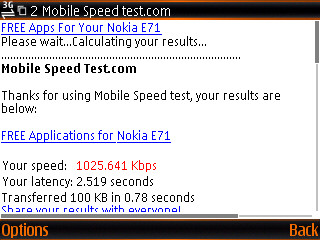
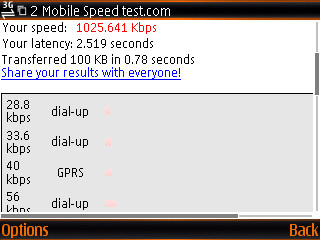
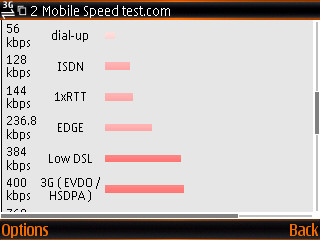
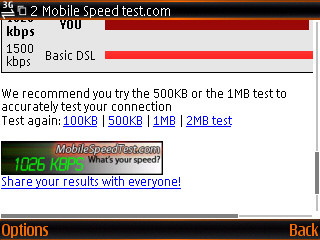
You will be surprised to know that highest speed I got is 1026kbps (I have a screen shot of the same, which i am pasting here) average i got is around 400 kbps which is amazing for a handheld device.
Screenshots :
Video Call
I tried video call also video is smooth voice service is excellent. always keep it in dual mode instead of UMTS, because at times mostly inside the house 3g signal bar is 2-3 only (I found this problem in Kaushambi only, perhaps because of high-rise there). Call rates are quite competitive, as I have heard they are going to lower it again and it is going to be better than simply reliance, except the roaming.
Network Coverage
Coverage is excellent. I tried in most of the east central west (except Rohini/Dwarka and pashchim VIhar), south Delhi and I found everywhere 3g signal with full strength.
Only problem is roaming as i confirmed from mtnl, if you roam out of delhi network, you may be able to use 3g on bsnl and mtnl mumbai network, wherever it is available, but you will not be able to use your free data plan there you will be charged as per the bsnl or mtnl delhi data rate per mb uses. So when it comes to roaming airtel mobile office seems the best option.
Well, if you are hard core Delhiite, go for 3G and you will enjoy it.
If you would like to share a review email us contact@telecomtalk.info
–TelecomTalk take no liability for the views expressed by our readers.
If this article saved you time or helped you decide better, consider supporting our work.
 Support Telecomtalk










 I took a connection on 12-10-09. I was really skeptic about their claim since i have never read a good review of PSU telecom products well, to my surprise the sim got activated within minutes.