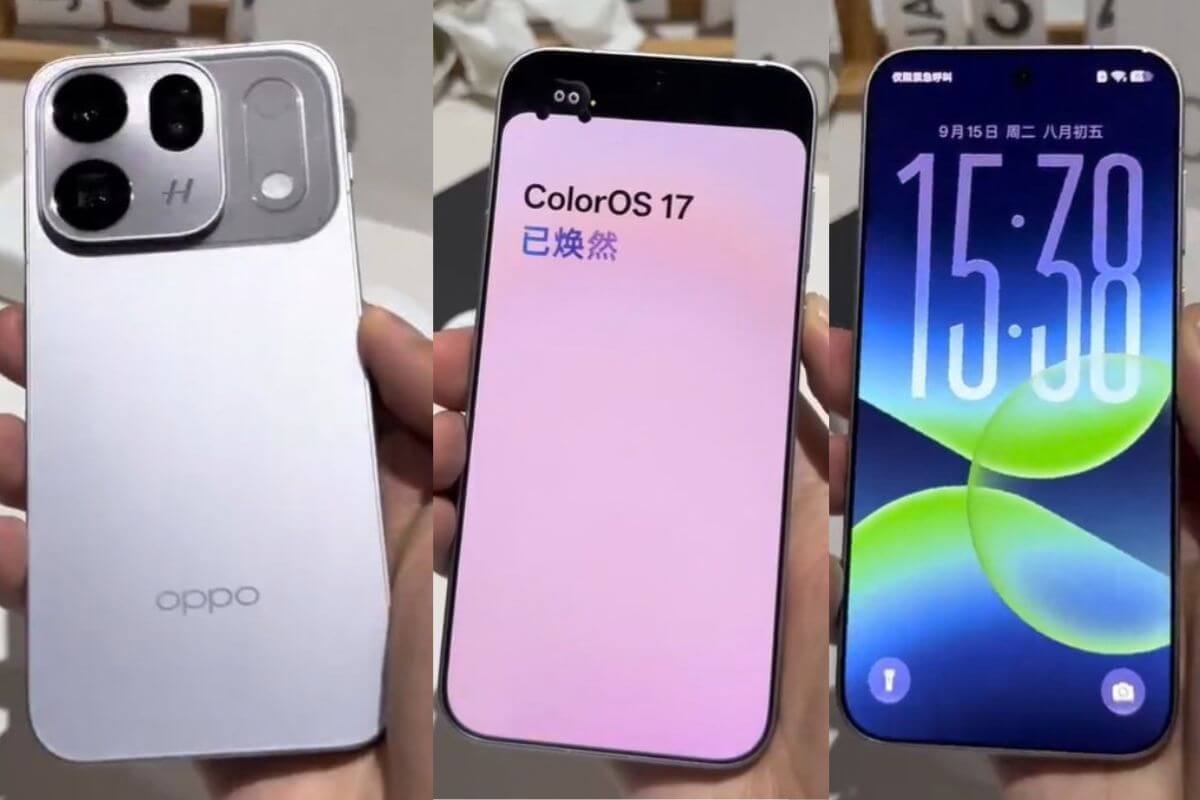
Oppo is taking a bold new stance in AI. AI is no longer just a chatbot interface. Oppo’s vision focuses on improving your productivity with native AI. Chinese smartphone makers have achieved this with the new ColorOS 17 upgrade, which adds native AI support to their latest flagship, the Oppo Find X10 series, launched in China on September 24, 2026. The Find X10 series gains native AI access through the ColorOS 17 upgrade, showing Oppo’s forward-looking focus on AI. Here are the top 5 features you must try with ColorOS 17’s new AI upgrade.
Oppo recently launched its new Find X10 smartphone lineup, among the top-end premium phones it offers.
This year, alongside higher-end hardware specs, Oppo also brings new software upgrades integrated with ColorOS 17, based on Android 17.
The upgrades focus on AI capabilities that users can use and integrate into their day-to-day smartphone workflow, including office work and learning.
Oppo has adopted an integrated “On-Device LLM,” allowing the phone to understand your queries without relying on server-based models.
This will reduce memory consumption by 48% and power consumption by 55%, so you don’t have to worry about high memory utilization.
Oppo has also added Memory Symbiosis Engines, which can understand users’ behavior over time, record and store information, and present it to users. Let’s take a look at the other AI features.
1. Upgraded Xiaobou AI Assistant
With the on-device LLM, Oppo’s AI assistant, Xiaobou, gets a major upgrade: it’s now more understanding and can handle many tasks on your phone.
Oppo has also optimized cloud-device collaboration, so when you need to connect to the cloud AI server, Xiaobou is more efficient.
Also Read: OPPO K14 Plus 5G India Launch Date Confirmed
2. Upgraded AI Imaging Features for Photos
Oppo’s Find X10 series is best known for its flagship camera. Oppo has also upgraded its camera app with native AI support.
With the new ColorOS 17, the Find X10 gets “AI Imaging Features” that let you edit photos more professionally, adjust lighting and tone, and create natural-looking, high-quality photos.
This will help enhance photos taken with the Find X10’s flagship 200MP camera, while the Find X10e comes with a Hasselblad-partnered and developed 50MP triple-camera system.s
You also get support for the Danxi Colour Restoration Lens (2nd generation); its new features use the LUMO colour palette to help restore skin tones and even environmental scenes.
The AI photo editor uses what it learns from DaVinci’s database, and with just a prompt, you can edit amazing photos without needing to learn DaVinci.
3. AI Features for Video Creation
For better video creation, it’s not only the software but also the hardware that plays an equal role in producing stunning shots, and the Find X10 doesn’t leave any gaps when it comes to top-tier camera sensors.
Oppo also claims that their new Find X10 5G phone will be the first-ever “Android Phone to implement Open Gate,” which uses the sensor’s native aspect ratio for direct capture; this means you’ll have more freedom to crop when editing your pictures.
You can also use the AI composition features, where the on-device LLM uses the LUMO Colour palette to process and edit people and scenery, making them look more natural.
Also Read: OPPO Find X10 Pro Max Launched: Specifications and Price
4. Oppo Introduces All-New AI One Tap Flash Note Feature with ColorOS 17
Oppo designed this for people who use their phones for note-taking, and with native AI, it now brings the all-new AI One Tap Flash Note feature: a single-tap shortcut that lets you access the information you need instead of taking notes.
For example, you can build a shortcut button that lets users access important items like delivery pickup codes, contact information, concert details, and other data the phone has collected.
Oppo’s native AI app also helps with multitasking; the phone can be used for meetings, note-taking, and work simultaneously.
5. Oppo Brings AI-Powered Travel and Schedule Management Feature
Oppo also brings a new upgrade to ColorOS 17 for travelers, using native AI to help with travel plans.
The AI model can automatically generate itineraries with images and text, and also handle tasks like booking tickets, checking in for flights, and even renting a car, without you having to constantly research.
Here are some of the top 5 AI features you get with ColorOS 17. So far, this upgrade is available for the Oppo Find X10 series; we will see this upgrade on other Oppo phones in the near future.
Image Credits: Android (@midroid5G)
If this article saved you time or helped you decide better, consider supporting our work.
FAQs
What are the major AI features in Oppo ColorOS 17?
Oppo ColorOS 17 introduces native AI features, including an upgraded Xiaobou AI Assistant, AI photo and video editing, One Tap Flash Note, and AI travel and schedule management.
What is native AI in Oppo ColorOS 17?
Native AI in ColorOS 17 lets supported AI functions run directly on the device using an on-device LLM, reducing the need to send every request to cloud AI servers.
Which Oppo phones get ColorOS 17's new AI features?
Oppo highlights the new native AI experience on the Oppo Find X10 series and plans to bring some of these capabilities to more devices.
What can Oppo's AI photo editor do?
AI imaging tools help users adjust lighting, tone, people, and scenery in photos. Oppo integrates its colour-processing technology to produce more natural results.
What is on-device LLM in Oppo ColorOS 17?
An on-device LLM is an AI language model that processes supported requests directly on the smartphone instead of relying entirely on remote servers. Oppo says this approach improves efficiency and reduces memory and power needs for certain AI workloads.
 Support Telecomtalk