Support Telecomtalk







Andrew Bonwick
Vice President of Product Development at Relm Insurance

Madhav Sheth
CEO of Ai+ Smartphone

Varun Kashyap & Sridevi Reddy
Co-Founders, Zithara.ai
Transforming Indian Offline Retail and Customer Engagement Using AI



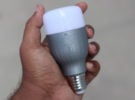
Xiaomi has risen from merely being a smartphone brand in India to earn a reputation as a full-fledged electronics manufacturer. This has been owing to Xiaomi’s innovative products which the company has introduced firstly in China and then in India. Xiaomi has launched many innovative products like pollution mask, Mi Soundbar and more. There is another handy product in Xiaomi’s portfolio, which was firstly retailing in China but now has made its way to India. The product that we are talking about is the Mi Smart LED Bulb (E27 Base) which is available for purchase on Amazon, Mi.com and Flipkart for Rs 1,299. Here is the complete review of the Xiaomi Mi Smart LED Bulb.
- Make Telecom Talk My Trusted Source



Design and Build Quality
The Mi Smart LED Bulb comes in a single variant in India with grey colour. The design and build of the product are also impressive, and it looks ergonomic. The highlight of the bulb is that it can be fit inside a lamp using a B22 converter or it can be used separately in a holder like a normal lamp. While in China, the bulb comes with Yeelight branding, in the Indian variant, the phone comes with Mi branding.
Setting Up Mi Smart LED Bulb
It is also worth noting that since the Mi Smart LED Bulb is a “smart” product, it will need to be set up like one. The bulb will have to be connected with your phone from where you will be able to control it. Firstly, you should ensure that you have a B22 converter handy with you to convert the bulb from E27 base. The bulb doesn’t come with one, so you will have to buy it on your own.
To set up the bulb firstly download the Mi Home or Yeelight app from the Play Store and then sign in using you Mi account ID and password and set up the country as India. Now on the Mi Home app, you can either tap on the “+” icon to add the Mi Smart LED Bulb upon which it will detect nearby devices on its own or you can manually add the Mi Smart LED Bulb to your Mi Home app. You will then need to reset the bulb by clicking the light switch, and after that, you will have to turn on and off the bulb five times to connect. The bulb will then start flashing in multiple colours and then emit white light after 5 seconds. Now on your Mi Home app check “Operation Confirmed” and then tap on “Next” to connect the Mi Smart LED bulb to the router. Lastly, select the router from the list, enter the password and click on OK. Now you would have successfully paired Mi Smart LED Bulb with your phone.