


WhatsApp Owner Zuckerberg Has Likely Made Millions of Users Happy

It is a highly requested feature that might result in a boost for iPhone sales. Last year, Meta owned WhatsApp had launched iPhone to Android data transfer, but now, Android to iPhone data transfer is also here.

Most readers read for free. A small group from the TelecomTalk community keeps this going. Support only if our work adds value for you.

Highlights

  • One of the big reasons why users fear purchasing an iPhone while using Android is the fear of losing all WhatsApp data.
  • It is a highly requested feature that might result in a boost for iPhone sales.
  • Last year, Meta owned WhatsApp had launched iPhone to Android data transfer.

Follow Us

WhatsApp

One of the big reasons why users fear purchasing an iPhone while using Android is the fear of losing all WhatsApp data. iPhones collect their WhatsApp backup data in iCloud while the Android devices leverage Google Drive. This is the reason why when Android users shift to iPhones, they lose all their data of WhatsApp. But now, Mark Zuckerberg, the CEO and owner of Meta known for founding Facebook has announced that WhatsApp is getting the ability to securely switch between phones and transfer the chat history of users between Android and iPhone. All of this will be done while maintaining end-to-end encryption.


It is a highly requested feature that might result in a boost in iPhone sales. Last year, Meta-owned WhatsApp launched iPhone to Android data transfer, but now, Android to iPhone data transfer is also here.

How to Transfer WhatsApp Chat Data from Android to iPhone (Latest Details and Steps)

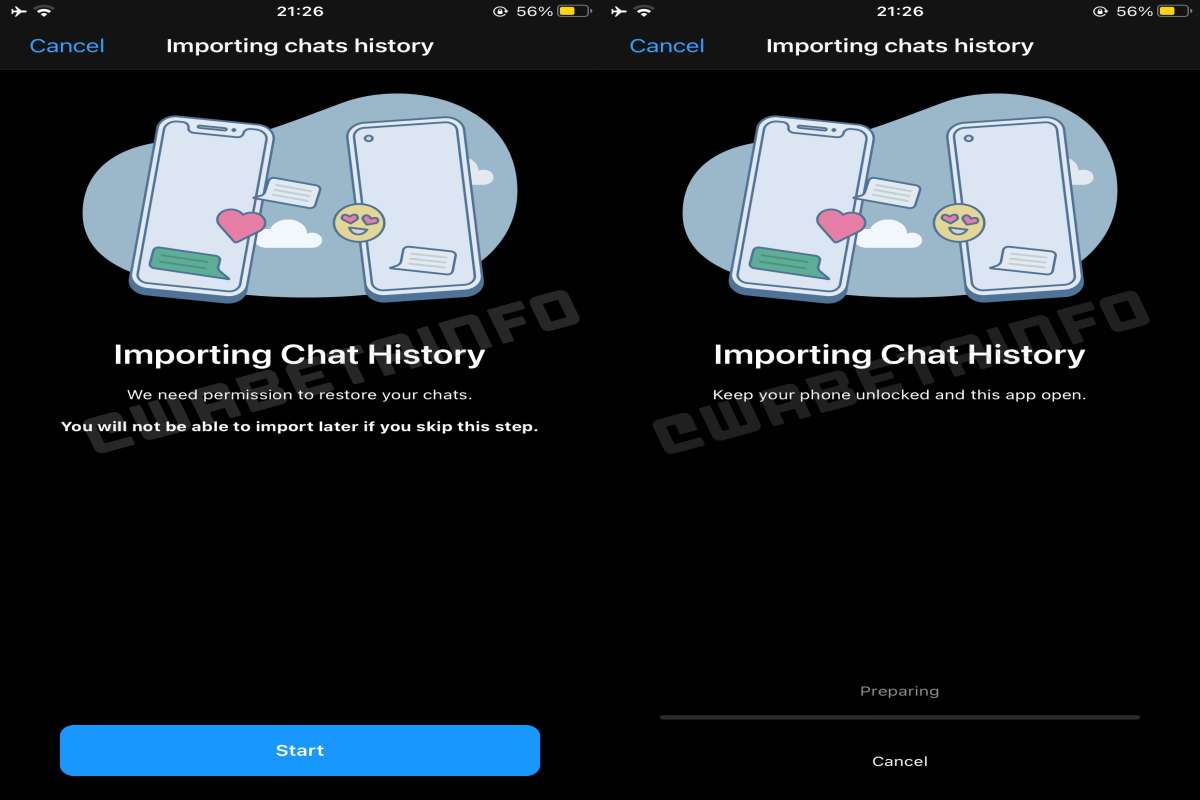
If you are thinking of transferring the WhatsApp chat data from Android to iPhone, here are a few pointers you must note (shared by WABetaInfo).

Step 1: Ensure that both the iOS and the Android running devices are connected to a power source because the transfer can take some time.

Step 2: The iPhone you are transferring the data to should be an all-new device or just factory reset it.

Step 3: Open the Move to iOS app on the Android device and follow what the application is saying.

Step 4: Enter the code that’s on your iOS device. Don’t forget to select WhatsApp right within the Transfer Data Screen.

Step 5: Tap start on the Android device and don’t do anything else until the data transfer is completed. Your Android device will sign you out once the data migration is complete.

Step 6: Continue with the iPhone and wait for the Move to iOS for completing the process.

Step 7: Use the same number for signing into WhatsApp on the iPhone. Once you are logged in, you will find all your data.

Most readers read for free. A small group from the TelecomTalk community keeps this going. Support only if our work adds value for you.

Reported By

Editor in Chief

Tanay is someone with whom you can chill and talk about technology and life. A fitness enthusiast and cricketer, he loves to read and write.

Recent Comments

Faraz :

What a transaction, BSNL had around 100 million 2G/3G customers in 2015-16. After a decade and successful 4G transition, BSNL…

BSNL Has Successfully Transitioned from a 3G Provider to a…

Faraz :

So now that 99 and 249 plan will disappear, and 84 days plan will be like 899 of Airtel? I…

Vodafone Idea CEO on Tariffs: Will Opt for Minor Corrections,…

Rohit :

First time koi vi ka ceo sensible baat kiya warna jo aaye Airtel ka rate chart utha k bak dete…

Vodafone Idea CEO on Tariffs: Will Opt for Minor Corrections,…

Integration of mind :

Unfortunately in my place I no longer get bsnl 3g in which bsnl has shutdown 3g but no bsnl 4g…

BSNL Has Successfully Transitioned from a 3G Provider to a…

Aunty :

Yes Waste poor Network. Govt should close BSNL immediately.

BSNL Has Successfully Transitioned from a 3G Provider to a…

Load More
Subscribe
Notify of
guest
4 Comments
newest
oldest most voted
Inline Feedbacks
View all comments