Bored of staring at your old screen on your Android smartphone? One of the Android’s main strengths has been the ability to customise your device as per your liking. You can tinker and tweak home screen of your smartphone until you have your dream screen.
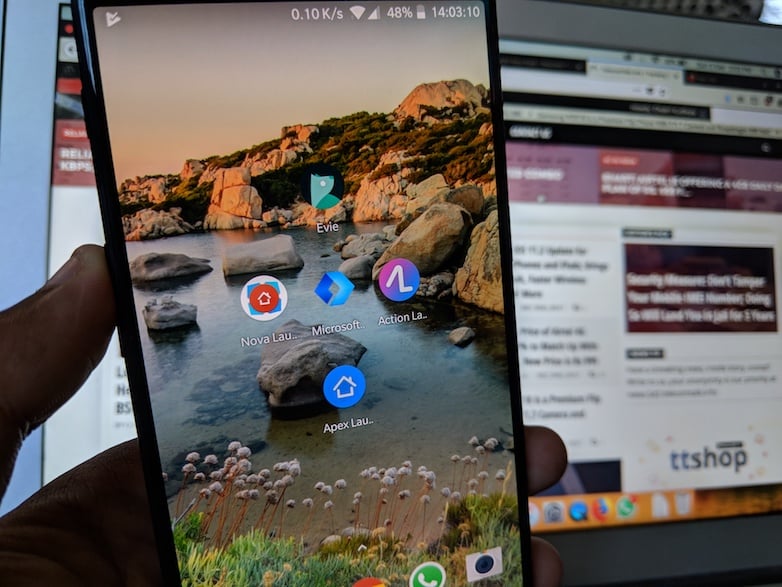
One of the easiest way to completely change the looks of your interface is to use an Android launcher. The launcher is responsible for the home screen, app grid, colour scheme, icons, backgrounds and lot of other details. But there are a number of launchers available on Google Play Store and determining the best is quite a hard job. We have picked up top 5 android launchers which are worth trying.
Nova Launcher
Nova is one of the standout Android home screen launchers by Teslacoil Software. The Nova launcher is one of the best Android launchers out there with enough features for customisation without compromising on performance. For many, it is the go-to launcher for its extensive customisation, speed, and quick implementation of new features.
One of the USPs of Nova launcher is the control it provides with even the free version. You get to change animations, colours, layouts, icons, and more. Additional features can be unlocked via their beta program.
Nova Launcher also has a paid Prime version which retails for $5. With Prime, you can customise gestures, unlock extra scroll effects, and ability to create apps groups within app drawer, but the free version should be enough for most people.
Apex Launcher
Similar to Nova, Apex launcher is for power users who love tweaks and customisation. It blends performance and ease of use with a good level of customisation to deliver an appealing alternative to most standard Android launchers.
The highlight feature of Apex includes a superb tablet mode and a theme manager for a uniform look throughout your home screen. Much like Nova, the majority of features are available for free. There is also a Pro version for $3.99 which offers additional features such as App Groups to let you create tabs in the app drawer, unread counters, widgets in the dock and other useful gestures.
Action Launcher
If you are still waiting to upgrade to Android Oreo, then you might consider getting Action Launcher. Action Launcher offers a ton of customisation options and features. One of the greatest selling points of Action Launcher is the implementation of features such as QuickDrawer, Shutters, and Covers which helps to reduce on-screen clutter.
Another feature is Quick Theme which automatically themes the search bar, folder backgrounds, and more based on the wallpaper. Action Launcher paid version goes for $4.99 which unlocks a host of features like app shortcuts, notification dots, individual icon theming, shutters, and unread counters.
Evie Launcher
If you are new to customising your home screen, Evie launcher is your go-to app. It is simple home screen app and by far easiest to customise. Evie is targeted at beginners who are intimidated by all settings and controls in other launchers. There are no more than eight options within each setting tab.
One of the biggest strengths is its intuitive UI design. A feature you would love the best is that each customizable setting has a display that shows your changes in real time. This makes easy for you to understand what you are actually doing. In addition, Evie is the only launcher that lets you backup your layout to your Google Account. The allows users for quick transfer of their design whenever they switch phones.
Microsoft Launcher
Microsoft continues its love for Android with its all-new Microsoft Launcher, formerly called Arrow Launcher. It’s been around for a while now, but it did get a big update. The launcher offers a rather simple and beautiful way to customise your Android experience by changing the theme colours, wallpapers or icon packs.
Microsoft launcher has three home pages, each assigned to a specific category. The first is a People page with most used contacts. The second is Apps page, which shows frequent and recent apps while the third page is for Notes & Reminders. There is app drawer at the bottom which lets you scroll through apps in alphabetical order. Do note that Microsoft launcher uses Bing as default search engine.
Every article you read here is the result of time, research, and effort. If you feel it adds value, you can support TelecomTalk.
 Support Telecomtalk