Support Telecomtalk







Andrew Bonwick
Vice President of Product Development at Relm Insurance

Madhav Sheth
CEO of Ai+ Smartphone

Stephen Rose
CEO Render Networks




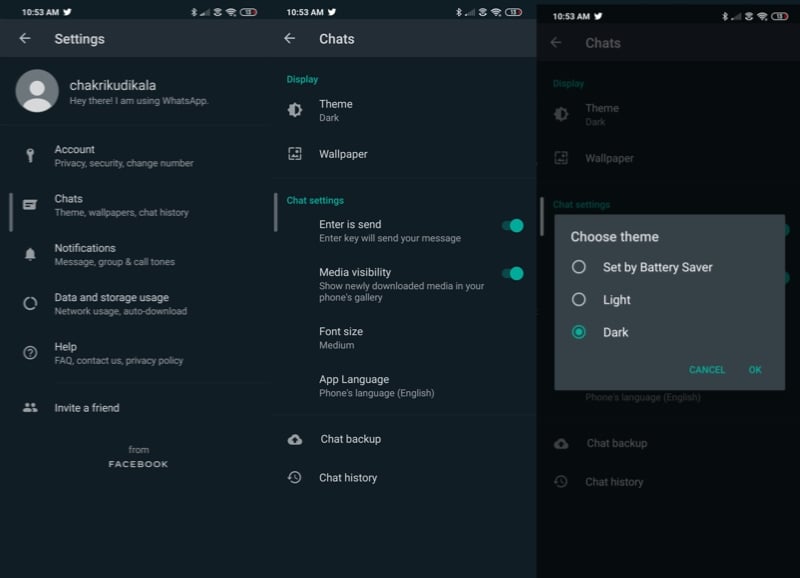
WhatsApp is finally getting the much-awaited dark theme functionality with the latest beta update. WhatsApp Beta for Android v2.20.13 comes with Dark Theme facility, which can be enabled via the app settings manually. After updating to the latest beta version, WhatsApp users can spot the new ‘Theme’ option under Chats section in the app Settings page. WhatsApp has been working on the Dark Theme feature ever since Google announced Android 10 last year. But it took the company nearly a year for rolling out the feature to the public. That said, the feature is still available only to the WhatsApp Beta users on the Android platform. The stable version of WhatsApp may get the feature in the coming weeks or months after the company testing it with the beta users.
- Make Telecom Talk My Trusted Source






WhatsApp for Android Beta Now Offers Dark Theme: How to Enable
Facebook-owned WhatsApp has been working on several new features and one of them is Dark Theme. Finally, the instant messaging platform is getting the feature. WhatsApp’s Dark Theme is pretty decent for a first-generation feature. Unlike the dark theme available on smartphones from Xiaomi, Realme and so on, WhatsApp’s theme has a grey hue and not the pitch black hue. While some may feel the company should have gone for an entire black theme, the grey theme also looks pretty decent.
The Dark Theme on WhatsApp can be enabled in a very easy way. WhatsApp Beta users can hit the three-dot icon for going into the Settings of the app. After entering the Settings of WhatsApp, follow this procedure- Chats>Theme>Choose Theme. WhatsApp displays three options- Set by Battery Saver, Light and Dark. If you enable the Dark option, then the overall app will become dark and the new theme gets applies. Light theme is the same one which WhatsApp used to offer earlier, so changes in that. As for the battery saver option, it enables Dark Theme based on the current battery life on your smartphone.