Support Telecomtalk







Andrew Bonwick
Vice President of Product Development at Relm Insurance

Madhav Sheth
CEO of Ai+ Smartphone

Stephen Rose
CEO Render Networks



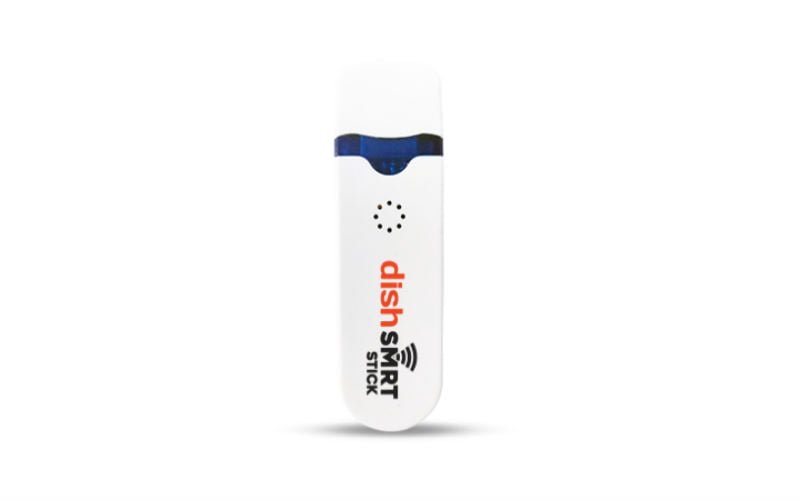
Dish TV has a unique offering for its subscribers called DishSMRT Stick. This stick is very identical to the d2h Magic stick that was announced by Dish TV India for D2h subscribers a couple of days ago. The functionality of both these sticks is similar as they come bundled with OTT apps allowing users to stream content from OTT services through Dish TV or D2h Set-Top Box. Yes, you heard it right. DishSMRT Stick can also be connected to the Dish TV Set-Top Box and the setup process is very easy, which we have detailed below. DishSMRT Stick is available at a price of Rs 599 for Dish TV customers right now, whereas the d2h Magic stick is available at just Rs 399 for D2h customers as part of the introductory offer. Similar to d2h Magic, DishSMRT also comes pre-installed with Watcho TV app allowing users to watch Live TV through the internet along with Catch Up TV service.
- Make Telecom Talk My Trusted Source





DishSMRT Stick Details
The first thing that Dish TV subscribers will have to do in order to access OTT content on their set-top box is to buy the DishSMRT Stick. The DishSMRT Stick is available for Rs 599, and it is a small dongle which plugs into your set-top box. The DishSMRT Stick dongle establishes internet connection and links the Dish TV STB to the network so that the users can stream OTT content on the screen. To establish an internet connection and to start watching shows online firstly, you will have to plug in the DishSMRT Stick into your set-top box. Next, you will have to connect the dongle to a Wi-Fi network, or a mobile hotspot network would also do. Next up, use the menu to select the network and then type in the password to connect.