We recently shared with you the initial impressions of the Jio Mi-Fi pocket router which acts as a bridge between non VoLTE smartphones and voice services on Jio’s 4G LTE network. Today we would like to share with you the look and design of the app which makes this possible and brief you about its features and capabilities.
Jio join app is a one stop solution for all calling and texting needs for users who wish to enjoy these services on Jio’s 4G network without relying on a fall back to 3G or 2G network of a partner operator. Calls made over the LTE network offer HD voice with better clarity than analogue cellular voice. Jio Join app can be installed on 4G smartphones lacking VoLTE or even on WiFi enabled non 4G smartphones to be used in conjunction with the MiFi device.
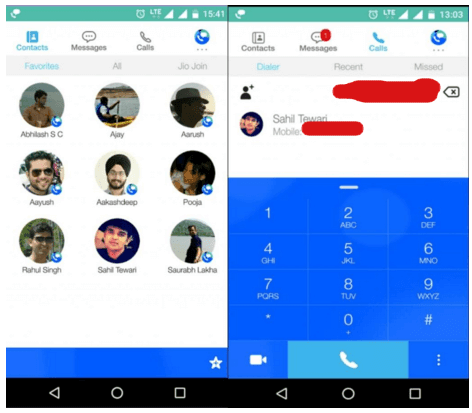
Layout wise the app has a minimalistic approach with 3 neat sections for contacts, messages and calls. For phones which will only be used on the Jio network, the app can be set as the default dialer to make outgoing calls. For phones which have another operator’s sim inserted and wish to make calls through the connected Jio MiFi device, the Jio Join app will prompt each time a number is dialed from the stock dialer and ask whether the call should be placed on cellular network or routed as a VoLTE call on the Jio network.
The contacts section has 3 sub sections for favourites, All contacts and contacts who have Jio Join app installed. Clicking on a contact’s display pic gives a popup card which gives options for chatting (SMS with non Jio join users or instant messaging for Jio join users), audio calling, video calling or sharing of files (with other Jio join users). Other features exclusively available for calling Jio join users include Rich call and Urgent call. A rich call allows the caller to attach a customised short message, a photo and a GPS location which would give a brief idea to the receiver of the call what the purpose of the call is even without picking it up. Also calls can be marked as urgent to ensure they are picked up on a priority basis by the receiver.
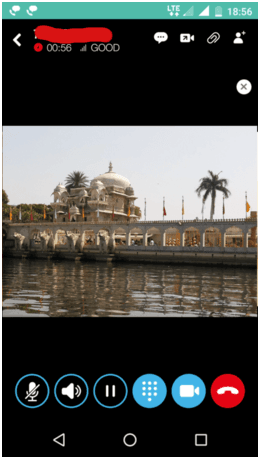
The video calling interface is pretty standard as visible in the screenshot above. During a live video call the options available are mute and unmute the microphone, mute or unmute the speaker, switch on or off the camera, put the call on hold, pull up the dialer pad, switch between front and back cam, send a text message or attach and send a file. The design is intuitive and user friendly. An indicator towards the top left indicates the total call duration and the current signal strength.
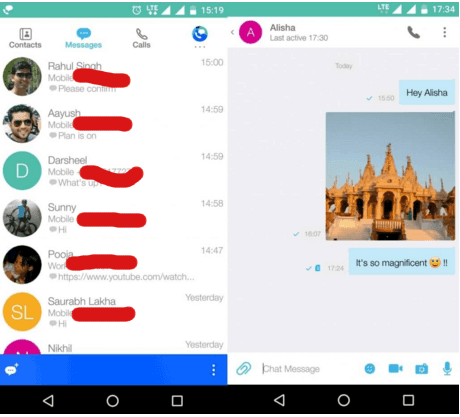
Jio join can be set as your default SMS client. The layout of the messages section is very similar to that of the Jio chat app. Clicking on a conversation reveals the chat window with the conversation in thread view. To non Jio join users you can send regular SMS and to fellow Jio join users you can send instant messages, share images, videos, voice recordings, GPS location, .zip and .pdf files. To the top of the chat window there is a phone icon which acts as a shortcut to place a VoLTE call to the person you are chatting with.
Note: All data consumed while making a voice call to non Jio join numbers through VoLTE on the Jio network is zero rated and only the per second or per minute calling tariff will apply just like a regular GSM call and the same applies for data consumed in sending and receiving SMS to non Jio join contacts. However when making a call through VoWiFi on a third party non Jio WiFi network, the subscriber may be charged for the data consumed by his broadband provider. All calls and instant messages to fellow Jio join users will be free.
Some people read for free. A few choose to support. If you found TelecomTalk useful, you can help keep us running.
 Support Telecomtalk