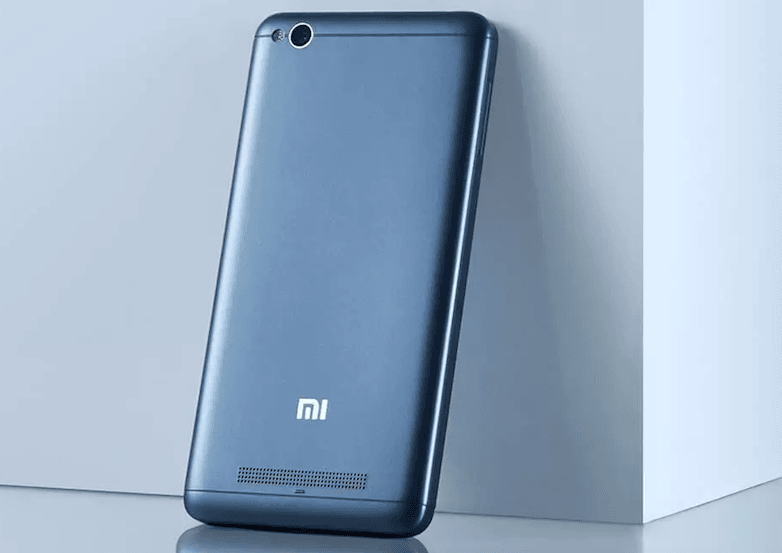
Xiaomi has finally started rolling out Android 7.1.2 Nougat based MIUI 9.2.6 Global Stable ROM update to the entry-level Xiaomi Redmi 4A smartphone users. The Redmi 4A, which was launched back in March 2017 is the only Xiaomi smartphone to receive the MIUI 9 stable update this late as other devices launched in 2017 already received the update. The Redmi 4A users on MIUI 8 Global Stable ROM will receive a new OTA update weighing 1.3GB in size. And it brings all the MIUI 9 features to the Redmi 4A such as reading mode, simplified user interface, new lockscreen icons, new MIUI theme, and so on.
The update is rolling out with version number V9.2.6.0.NCCMIEK and Xiaomi released the Fastboot and Recovery ROMs if in case a user wants to flash them manually. If you can’t wait for the update to reach your smartphone, you can head over to MIUI Forums page and download the recovery ROM to manually flash it.
With this rollout, Xiaomi is inching towards the completion of MIUI 9 Global ROM rollout to all the third batch of devices. Xiaomi also said that it’s currently looking for Global Beta ROM testers for the Redmi 5, Redmi Note 5 and Redmi Note 5 Pro smartphones.
Here’s the complete changelog of MIUI 9 Global Stable ROM V9.2.6.0.NCCMIEK for Redmi 4A
Highlights New – Reading mode can turn on and off at sunset and sunrise automatically (05-03)
New – Improved layout and readability for search results in Contacts (06-29)
New – Virus scans and payment scans were merged into Security scan (06-29)
New – Better blocklist rules with the possibility of separated rules for every SIM card (07-10)
New – Switch for turning Battery saver automatically when charged (07-19)
New – New display formats for update logs in Updater (07-25)
New – Search for apps in the Dual apps settings (08-03)
New – Mi Picks gets a new name and a new icon! Meet Apps! (08-21)
New – Android N 7.1 update (11-21)
New – Reading mode can turn on and off at sunset and sunrise automatically (05-03)
New – Improved layout and readability for search results in Contacts (06-29)
New – Virus scans and payment scans were merged into Security scan (06-29)
New – Better blocklist rules with the possibility of separated rules for every SIM card (07-10)
New – Switch for turning Battery saver automatically when charged (07-19)
New – New display formats for update logs in Updater (07-25)
New – Search for apps in the Dual apps settings (08-03)
New – Mi Picks gets a new name and a new icon! Meet Apps! (08-21)
New – Quick ball goes back to the edge after 3 seconds of inactivity (08-30)
New – Mi Mover, supports data migration restarting. During migrating data to the new phone, device hotspot connection will be restored automatically in case of interruption to complete the data migration. (10-25)
New – Simplified the UI (10-31)
New – New App vault features: shortcuts, brief notes, and calendar events. (Supported on Android 5.0 or later). (11-07)
New – New App vault features: shortcuts, brief notes, calendar events, and cricket. (Supported on Android 5.0 or later). (11-16)
optimisation – Cleaner removes empty folders better now (07-10)
optimisation – Protection from unintentional tapping for Dial pad (08-08)
optimisation – Redesigned home page (08-24)
optimisation – Devices with rare Bluetooth profiles are hidden in the device list (08-29)
optimisation – Simplified and improved the design of the virus scan result page (09-07)
optimisation – Cleaner removes empty folders better now (07-10)
optimisation – Protection from unintentional tapping for Dial pad (08-08)
optimisation – Redesigned home page (08-24)
optimisation – Devices with rare Bluetooth profiles are hidden in the device list (08-29)
optimisation – Simplified and improved the design of the virus scan result page (09-07)
optimisation – Hide free and incompatible themes in the list of the purchased items (10-10)
optimisation – “Add to favorites” icon adjustments (10-24)
System
New – Android N 7.1 update (11-21)
optimisation – Increased system decryption speed (06-23)
optimisation – Increased system decryption speed (06-23)
optimisation – Devices with rare Bluetooth profiles are hidden in the device list (07-25)
optimisation – Devices with rare Bluetooth profiles are hidden in the device list (08-29)
optimisation – Increased system decryption speed (06-23)
optimisation – Increased system decryption speed (06-23)
optimisation – Devices with rare Bluetooth profiles are hidden in the device list (07-25)
optimisation – Devices with rare Bluetooth profiles are hidden in the device list (08-29)
Fix – Home screen loaded too slow with Android 7.1 (06-23)
Fix – Apps changed Wi-Fi connection status without the user’s permission (06-23)
Fix – Apps stopped working in the background (06-24)
Fix – Developer options couldn’t be opened using Bahasa Indonesia (08-15)
Fix – Music stayed in the Notification shade after exiting the app (08-15)
Fix – Home screen loaded too slow with Android 7.1 (06-23)
Fix – Apps changed Wi-Fi connection status without the user’s permission (06-23)
Fix – Apps stopped working in the background (06-24)
Fix – WhatsApp force closed in Split screen (08-29)
Fix – Long pressing soft buttons lead to FC issues (09-19)
Fix – KRACK WPA2 security vulnerabilities (10-19)
App Lock
New – Added the App lock step before unlocking using a new fingerprint for the first time (08-15)
New – Added the App lock step before unlocking using a new fingerprint for the first time (08-15)
New – App lock supports hiding messages from selected apps (10-31)
Phone
optimisation – Vibration no longer affects the features which reduce ringer volume when the phone is lifted or flipped to silence (10-10)
Fix – Issues with VoLTE calls (06-16)
Contacts
New – Improved layout and readability for search results in Contacts (06-29)
New – Improved layout and readability for search results in Contacts (06-29)
optimisation – Protection from unintentional tapping for Dial pad (08-08)
optimisation – Protection from unintentional tapping for Dial pad (08-08)
Fix – Contact search didn’t work properly for Russian and Ukranian (08-29)
New – Simplified the UI (10-31)
Messaging
Fix – OTP messages were grouped with notification SMS (06-16)
Fix – Time in Messaging didn’t change when the system was switched to 12-hour format (08-29)
Fix – Messages with one-time passwords disappeared (09-07)
Fix – OTP messages were grouped with notification SMS (06-16)
Fix – Time in Messaging didn’t change when the system was switched to 12-hour format (08-29)
Fix – Messages with one-time passwords disappeared (09-07)
Fix – Messaging force closed in some cases (09-27)
Delete – Adjustments for Messaging: service and promo SMS, scheduled SMS, and group messages. (05-17)
Delete – Adjustments for Messaging: service and promo SMS, scheduled SMS, and group messages. (05-17)
Lockscreen, Status Bar, Notification Bar
New – New content provider for Wallpaper Carousel – Glance. Enjoy high-quality images, read stories, and slide down to view more. (11-10)
optimisation – Vibration for notifications during calls (06-16)
optimisation – Notification shade response (07-04)
optimisation – Vibration for notifications during calls (06-16)
optimisation – Adjusted time for tapping the Lock screen notifications (10-24)
Fix – Lock screen wallpaper wasn’t shown in some cases (05-23)
Fix – Notification shade issues (06-16)
Fix – The search bar in the Notification shade wasn’t displayed correctly (06-27)
Fix – Female voice for English (Waiting for Wi-Fi) in the Notification shade (08-15)
Fix – Music player stopped working on the Lock screen after 10-15 minutes (08-15)
Fix – Wallpaper Carousel couldn’t load online resources (a Play Store update was required) (08-22)
Fix – Lock screen wallpaper wasn’t shown in some cases (05-23)
Fix – The search bar in the Notification shade wasn’t displayed correctly (06-27)
Fix – Wallpaper Carousel couldn’t load online resources (a Play Store update was required) (08-22)
Home screen
New – Animated icons for selected apps in the default theme (09-01)
New – Animated icons for selected apps in the default theme (09-01)
optimisation – RAM info isn’t shown in Recents by default. Go to Settings Home screen & Recents to turn it on. (05-09)
optimisation – Animation for clearing cache (05-09)
optimisation – Adjusted the button for clearing memory in Recents (05-16)
optimisation – Swipe response (06-14)
optimisation – Folders open faster (07-10)
optimisation – Users can set their main Home screen in the editing mode (08-29)
optimisation – New animation for launching and closing apps (09-01)
optimisation – RAM info isn’t shown in Recents by default. Go to Settings Home screen & Recents to turn it on. (05-09)
optimisation – Animation for clearing cache (05-09)
optimisation – Adjusted the button for clearing memory in Recents (05-16)
optimisation – Folders open faster (07-10)
optimisation – Users can set their main Home screen in the editing mode (08-29)
optimisation – New animation for launching and closing apps (09-01)
optimisation – Multiple themes supported on the clock widget (10-19)
optimisation – Move app icons into a folder easier (10-19)
optimisation – Adding widgets to an empty spot with a single tap (10-31)
Fix – Couldn’t close Recents in some cases (05-09)
Fix – Home screen icon wasn’t displayed properly (05-23)
Fix – Cleaner shortcut didn’t work (05-23)
Fix – Issues with icon size for Clock, Calendar, and Weather (05-16)
Fix – Home screen icon wasn’t displayed properly (05-23)
Fix – Cleaner shortcut didn’t work (05-23)
Themes
optimisation – Redesigned home page (08-24)
optimisation – Updated Peach blossom and Asphalt themes (09-14)
optimisation – Redesigned home page (08-24)
optimisation – Updated Peach blossom and Asphalt themes (09-14)
optimisation – Hide free and incompatible themes in the list of the purchased items (10-10)
optimisation – Themes prompt about connecting to the internet when it’s required (10-12)
optimisation – “Add to favorites” icon adjustments (10-24)
Fix – Previews in recent wallpapers rotated (09-20)
Camera
Fix – Language support issues (09-12)
Gallery
Fix – Image has been compressed multiple times (10-19)
Backup
New – Mi Mover, supports data migration restarting. During migrating data to the new phone, device hotspot connection will be restored automatically in case of interruption to complete the data migration. (10-25)
Fix – Mi Mover can’t continue to migrate data after the network connection is interrupted and restored (10-25)
Fix – Mi Mover can’t migrate all apps to the new phone (10-25)
optimisation – Improved design for Feedback (05-24)
optimisation – Improved design for Feedback (05-24)
Settings
New – Reading mode can turn on and off at sunset and sunrise automatically (05-03)
New – Search for apps in the Dual apps settings (08-03)
New – Reading mode can turn on and off at sunset and sunrise automatically (05-03)
New – Search for apps in the Dual apps settings (08-03)
optimisation – Reduced multiple steps for discovering Bluetooth devices (06-07)
optimisation – Input method animation appears after when search bar is tapped (06-07)
optimisation – Introducing Button and gesture shortcuts (09-15)
optimisation – Reduced multiple steps for discovering Bluetooth devices (06-07)
optimisation – Input method animation appears after when search bar is tapped (06-07)
optimisation – Introducing Button and gesture shortcuts (09-15)
Fix – TalkBack issues (06-07)
Fix – Android security patch level was shown with the wrong date (09-07)
Fix – Android security patch level was shown with the wrong date (09-07)
optimisation – Launching speed (07-01)
File Explorer
Fix – The number of docs in Explorer was shown as 0 (09-27)
Downloads
New – Downloads keep waiting when the connection is established again in case it was interrupted (09-05)
New – Downloads keep waiting when the connection is established again in case it was interrupted (09-05)
Recorder
Fix – Adjustments for Recorder and Second space (06-23)
Fix – Adjustments for Recorder and Second space (06-23)
Calendar
New – Introducing football cards with the info about major international leagues and matches (08-15)
New – Holiday cards for Russia (06-28)
New – Introducing football cards with the info about major international leagues and matches (08-15)
Blocklist
New – Better blocklist rules with the possibility of separated rules for every SIM card (07-14)
Notes
New – Notes can be saved automatically now (05-05)
New – Notes can be saved automatically now (05-05)
optimisation – Image format for sharing (05-05)
optimisation – View and Edit menus (05-05)
optimisation – Image format for sharing (05-05)
optimisation – View and Edit menus (05-05)
Mi Account
optimisation – Reduced the number of push notifications when the user is signed out (10-30)
Mi Drop
Fix – Transfer status wasn’t displayed correctly when a file participated in multiple transfers (10-12)
Fix – The app crashed while transferring a large amount of files (10-12)
Mi Drop
optimisation – Received files are sorted by time (11-06)
Fix – Issues with loading big GIFs (11-06)
Cleaner
optimisation – Cleaner removes empty folders better now (07-10)
optimisation – Cleaner removes empty folders better now (07-10)
Battery Usage
New – Switch for turning Battery saver automatically when charged (07-19)
New – Switch for turning Battery saver automatically when charged (07-19)
Security
New – Virus scans and payment scans were merged into Security scan (06-29)
New – Virus scans and payment scans were merged into Security scan (06-29)
optimisation – Simplified and improved the design of the virus scan result page (09-07)
optimisation – Simplified and improved the design of the virus scan result page (09-07)
Scanner
Fix – Scanner couldn’t work normally (09-12)
Fix – Scanner couldn’t work normally (09-12)
Quick Ball
New – Quick ball goes back to the edge after 3 seconds of inactivity (08-30)
Other
New – Mi Picks gets a new name and a new icon! Meet Apps! (08-21)
New – Mi Picks gets a new name and a new icon! Meet Apps! (08-21)
New – “Apps” support updates now (10-11)
Fix – Google widget disappeared because of the Dual apps (06-20)
Fix – Google widget disappeared because of the Dual apps (06-20)
Some people read for free. A few choose to support. If you found TelecomTalk useful, you can help keep us running.
 Support Telecomtalk