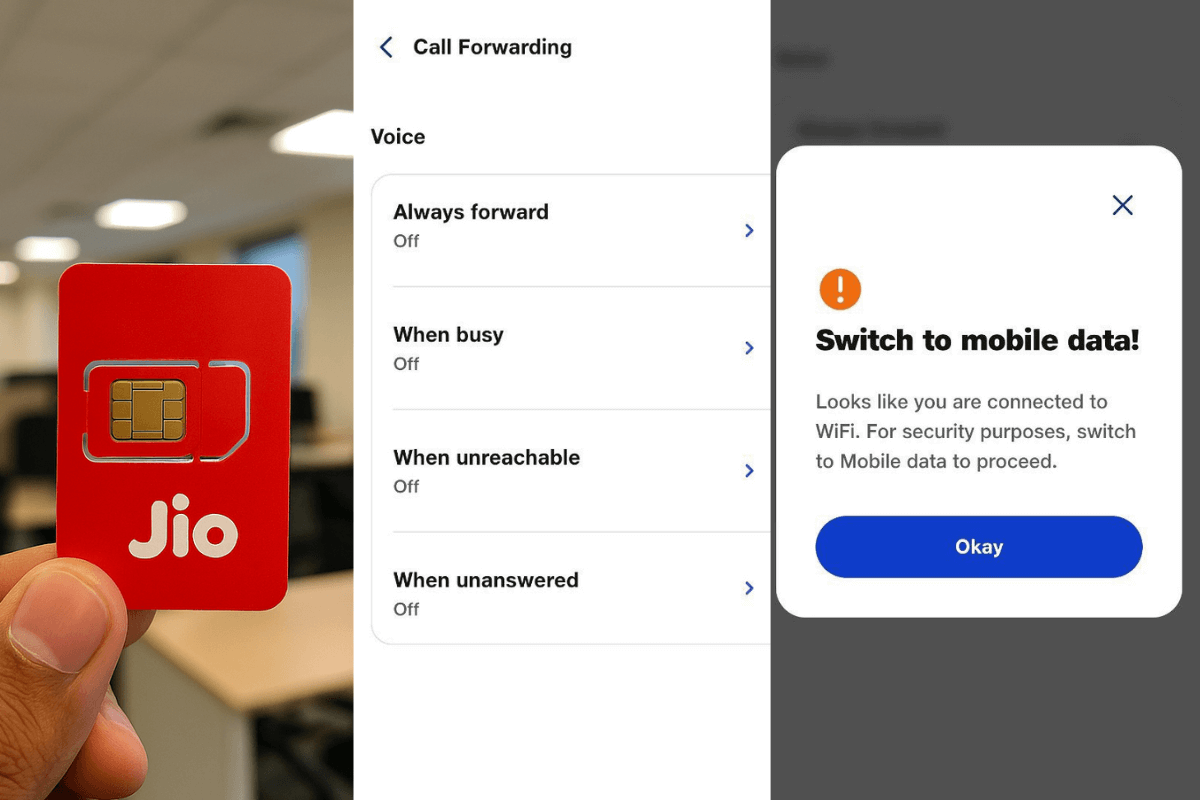
Reliance Jio has quietly introduced a new feature inside the MyJio app that allows users to manage call forwarding settings directly from the application interface. The move brings an additional layer of convenience for customers who previously had to rely on default phone settings or dialer codes to activate or deactivate call forwarding services.
Make Telecom Talk My Trusted Source
With this update users can now configure voice and video call forwarding options without navigating through their smartphone system menus. However the feature comes with an important condition that may impact how customers access it.
Call Forwarding Settings Now Available Within the MyJio App
The newly introduced functionality is available through the following navigation path inside the MyJio app:
MyJio > Profile > Mobile Settings > Service Settings > Call Forwarding > Voice and Video
Once inside users are presented with multiple call forwarding options such as Always Forward When Busy When Unreachable and When Unanswered. These options are similar to what users typically see inside their smartphone’s native call forwarding menu but are now accessible through Jio’s own ecosystem.
The feature appears to be aimed at simplifying service control for customers who may not be comfortable navigating device level telecom settings or remembering USSD based forwarding codes.
Feature Works Only on Mobile Data Connection
While the inclusion of call forwarding controls inside the MyJio app improves accessibility there is a significant limitation. The feature only activates when the user is connected to mobile data.
If a customer attempts to access or configure call forwarding settings over WiFi the app prompts them to switch to mobile data for security purposes before proceeding further. This requirement suggests that Reliance Jio may be routing the request through its network layer instead of allowing app level changes over external internet connections.
In practical terms this means customers must temporarily disable WiFi and enable mobile data to modify forwarding preferences from within the app.
Airtel Vi and BSNL Still Rely on Default Phone Settings
It is worth noting that other telecom operators in India including Airtel, Vodafone Idea and BSNL already allow users to activate call forwarding services using the default phone settings available on Android and iOS devices.
These operators typically support call forwarding through device menus or dialer based activation methods using standard network codes. Customers can configure options such as forwarding all incoming calls forwarding when busy forwarding when unreachable or forwarding when calls go unanswered directly from their handset.
This makes the functionality widely accessible without requiring a dedicated operator app or mobile data based authentication layer.
Network Led Service Control May Be the Next Step
Jio’s move to bring service level controls such as call forwarding into its application interface could indicate a broader shift towards app based telecom service management.
As telecom networks increasingly integrate digital customer touchpoints operators may look to centralise network service controls within proprietary apps rather than relying entirely on device level configurations.
For users the benefit lies in having a single interface to manage subscriptions recharge services network alerts and now call handling preferences without needing to switch between system menus.
However the mobile data requirement remains a small trade off for the added convenience offered by app driven service control.
A small group of TelecomTalk readers helps keep this platform running. Support us if you find our work valuable.
 Support Telecomtalk