


First look at Nokia Belle software update what has changed and our take on it.
Overall the phone’s performance increased a lot which cannot be explained and it should be experienced. We are just going to give you a small outlook on how Belle is going to be in this post.
Below you can see the four home screens that we get immediately after performing the update while two more can be added depending on our choice.The transition between the home screens is very fast as well as smooth.
You have to add a small widget for Cell Info Messages on the Home screen if you wonder where can we view the info updates. Believe me readers you will like that widget once you use it.
For those who are suffering with unwanted Data connections running in the background Belle brings an option for switching off/on Data connection. The most interesting feature added in Belle is the push drop down Notification bar added on the top which makes you access a few of the important features right away.
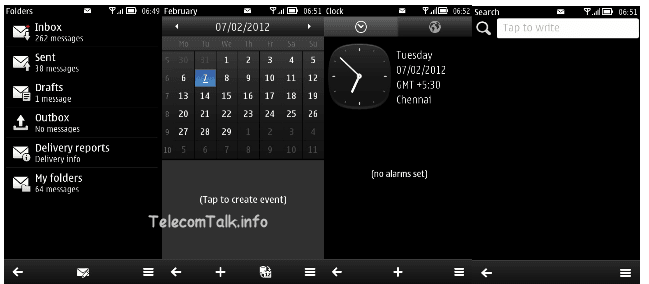
The interfaces of Messaging , Calendar , Clock/Alarm and Search which lets you search files and contacts from your device showed up like this on Belle.While the music player interface remained same there are small changes which can be noticed in the player. The volume pane is now showing on the left of the screen which previously used to be on the right.
The switching time between music widget and player is very fast. There is no much change in the settings for Music player but the video player interface is a bit polished.
Nokia Belle Update Screenshots
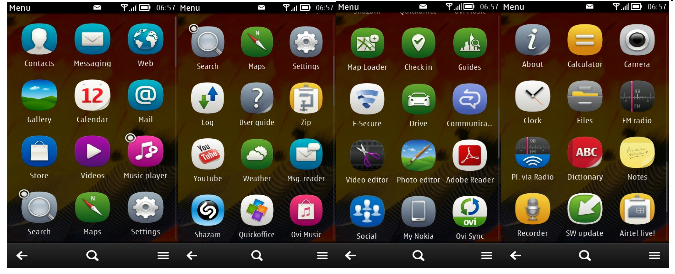
If you are worried about the default apps available after installation here is the list for you. F-Secure and few other Apps are installed automatically after the update is completed from the previously installed files available before update.
Anyways only F-secure is shown up here. Now there is also an option available to sort the apps according to alphabetical order.You can even create new folders and place apps of your requirement in that.
Nokia Belle is a major update approximately 279MB and you need to connect it via PC-Nokia suite to perform the update. To start, make sure you have the latest version of Nokia Suite (3.3 or later) running on your computer, and then connect your phone to the computer with a USB cable in PC-Suite Mode.
The backup and installation goes pretty fast and the update download depends on your internet speed. This update is provided free by Nokia if you update via Nokia Suite while you may need to pay for the software upgradation charges in case if you end up with a Nokia Care nearby.
Overall You will get a wonderful experience after you update your phone. What ever the reason might be, this update is a reason for Nokia smartphone users to rejoice after experiencing the performance of the updated devices irrespective of the present generation hardware used in many devices.
We are excited about the Belle update. Aren’t you? Do let us know via comments which feature you liked the most after the update?



Rakesh June 3, 2012 at 10:03 am
Please read “getting” mtnl signal in second line in place of “not getting”
Rakesh June 3, 2012 at 10:01 am
Recently I have upgraded my Nokia N800 to new Belle.
In my locality I am not getting MTNL signal but not able to call any number, numbae busy
indication immediately comes. Others also not getting my number, “this number does not exist”
indication they receive.
But as I leave the area, This phone works properly. MTNL is not able to solve my problem.
It has to do some GSM setting in that base stn and Belle feature.
After reaching my locality, able to call numbers for some time, but after 5-10 minutes again my phone is not available to the whole world!
This problem also repeated in one more locality (NSE exhibition area, Goregaon).
If I change the phone, it works! Can some NOKIA expert guess, what the problem is?
Mohammed Shahid March 7, 2012 at 7:00 pm
Will the QUICKOFFICE and ADOBE READER gets installed into my N8 once I update it with Belle. Because I lost these two when I did “RESTORE FACTORY SETTINGS”. Can someone please help me on this?
Er. Ashish Pandey March 2, 2012 at 8:14 pm
Belle update have some problem such that Flash Player crashes frequently……. i am not able to watch long duration videos which runs on Flash.
In Belle video player not recognizes FLV/mkv files and if you try to play these files directly from its memory location it opens in video player like a still images.
Suraj February 11, 2012 at 5:29 pm
Some bugs in BEllE..
1)connection flapping connected via USB to PC.
2)Restart of mobile phone too slow.
3)loading of app too slow like.. Ovi store.
4)If I have 3 nos saved in phone contact with same name. Now I got a call, I am unable to see exactly from which no. I got a call.
Vikas Patidar February 9, 2012 at 6:53 pm
@Pritam
If you are running Symbian Anna on your phone then surely you can update it for Nokia Belle but I think you have mentioned wrong device model number here.
Pritam February 9, 2012 at 5:56 pm
Can I update my Nokia 1100 to belle,currently it is running smoothly on Anna .
Amit.g February 9, 2012 at 12:54 pm
@Ganesh
Actually u need to have a data connection n then ur social n email accounts activated. Then u ll get the real experience.in people tile all ur fb frnds photos will be constantly shuffling in the from of mini tiles.
Ganesh February 9, 2012 at 12:14 pm
@Tarun del
Of course you can! I’ve Belle and the task switcher is exact same as Anna!
Ganesh February 9, 2012 at 12:13 pm
@Amit.G
I tried changing themes but only foreground and background colors could be changed… But may be if I tried using that phone in real life scenarios, it would be rather good…
Hmmm. I felt the exact opposite! I was initially impressed with WiMo 7.5 (before actually trying it). Then I went to a store and tried it first hand. I played with it for a 5 to 10 mins. Then I started to feel bored
Kaushik February 9, 2012 at 10:02 am
There’s one “Microsoft Apps” update which isn’t completing at all. 28MB downloaded but while installing it says some unknown error. Anyone facing this trouble?
Srikapardhi February 8, 2012 at 10:01 pm
@Tarun del
Hi Tarun del,
Thanks for the compliments.
It’s all my pleasure to hear appraisals from our beloved readers.
Yes,you can easily see the running apps and close them without actually opening them the same way as we do in Anna.
I’m able to close my apps without opening them actually on my N8-00 running on Belle.
Just hold the Menu button(Physical key) for few seconds which will open the ‘open Applications Menu’ from which we can close all the running applications without actually opening them.
Hope this helps.
Regards,
Srikapardhi
Ashutosh February 8, 2012 at 9:41 pm
@Tarun del
By Long Pressing the Home Key belleyou can get the tasbellek manager similar to one in anna.
Tarun del February 8, 2012 at 8:40 pm
Hi Srikapardhi,
Thanks for the small but beautiful review.
I have one question…maybe u can answer this
In Anna, we could easily see the running applications and close them without actually opening the application again. But here in Belle I don’t see any option to see all background running applications. Is this feature still there or am i missing something here. I am using N8
Please respond and keep doing the good work…Best of luck
Regards,
Tarun del
vishal February 8, 2012 at 7:54 pm
@Srikapardh..
yaeah… imean that nokia ovi suite only…but still its unable to update the software…its not showing any update..
Abhijith February 8, 2012 at 7:44 pm
@Munnna
yes sure . . Try ovi suit 3.3
Abhijith February 8, 2012 at 7:39 pm
@sunil kushwaha
worried . . . No problem soon am planning to switch over android
i45 February 8, 2012 at 6:03 pm
can i do it for my E72….will the upgrade be compatible
Srikapardhi February 8, 2012 at 5:02 pm
@vishal
PC suite don’t work for getting update done.
use europe.nokia.com/support/product-support/nokia-ovi-suite
download and try the update.
Abadan Mohapatra February 8, 2012 at 5:00 pm
The UI and Homescreen etc… are so colourful but message folders, calendar etc… are all black n white which is disgusting !
Amit.G February 8, 2012 at 5:00 pm
@Ganesh
Even i felt that UI is dull before buying but after trying i was so much impressed that i got one for me… Live tiles are actually pretty beautiful compared to our old stagnant Icons, i have arranged the tiles in such a manner that its more interesting, Left 1st is contacts where ur FB profile pic will be displayed as Icon, 2nd is TOI Live app which will be updating news regularly & displays headlines, 3rd is call which actually is of default tile coulour ( u can choose from 10 colours & display is very bright, more than belle), Next is weather tile which displays real time weather updates with blue cloud kind of back ground, 5th is messaging thread, 6th is pictures where pic will be shuffling on tile,… Like this u can add as many appps u want & pin them as tiles….
Trust me Emailing is very very easy & Office is awesome. u will get mail updates on tiles & on wallpaper too..
To be honest i visited Nokia store to buy Nokia 603 which is symbian belle phone, i used it & later the shop guy asked me to try Nokia Lumia & said that its very good. Later i went back & tried Samsung galaxy S plus but it didn impress me the way windows impressed me, so i went back & got Lumia 710
Srikapardhi February 8, 2012 at 4:51 pm
@suku
No
Vijay patidar February 8, 2012 at 4:33 pm
Waiting for the belle update for Nokia 1100 .boy it will rock man!!!
Ganesh February 8, 2012 at 4:21 pm
I updated to Belle yesterday! And boy it rocks! Awesome widgets and lots of home screens! Update is possible only via PC suit using Nokia Suit (Not Nokia PC suit, not Nokia Software Updater and not using OVI Suit). OTA using 3G or Wi-Fi is not available due to the huge file size.
The speed is pretty good after this update and it does feel like modern mobile browser!
@Amit.g
WiMo 7.5 is fast and smooth… But UI is very dull and not colorful. But it’s fast though.
suku February 8, 2012 at 4:20 pm
nokia 5233 is suite for this update?

Amit.g February 8, 2012 at 4:06 pm
Currently m using nokia lumia 710. Windows 7.5 is awesome guys. Just give out a try n ill bet u that u wont feel android and belle smooth like windows…. Web browser is butter smooth n integration of social networks isgreat.
But still using symbian also since its my one of the fav os but the sad part is N8 successor will be the last symbian device from nokia
vishal February 8, 2012 at 2:55 pm
please tell how to update NOKIA N8…its not showing in pc suite…its showing latest version is symbian anna….u can reinstall that software….has anyone updated their mobile??
Srikapardhi February 8, 2012 at 2:40 pm
Nokia Belle Nokia N8, Nokia E7, Nokia E6, Nokia X7, Nokia C6-01, Nokia C7, or Nokia Oro device.For Nokia 500,Belle will be made available within the next few weeks.
Srikapardhi February 8, 2012 at 2:39 pm
Belle update is available for Nokia N8, Nokia E7, Nokia E6, Nokia X7, Nokia C6-01, Nokia C7, or Nokia Oro device.For Nokia 500,Belle will be made available within the next few weeks.
Srikapardhi February 8, 2012 at 2:36 pm
@Gaurav Sahu
No , not possible on X6-00
Srikapardhi February 8, 2012 at 2:35 pm
@Pb
PC is required , No Wi-fi or 3G
Pb February 8, 2012 at 1:53 pm
@Srikapardhi
can we update our software through wifi or pc suite is required
Akzey February 8, 2012 at 1:44 pm
@Srikapardhi A small request to you, why don’t you add the compatible devices list on your article. Because people are excited to test it out and so they’re confused about they’re devices!
Gaurav Sahu February 8, 2012 at 1:21 pm
is this update possible on Nokia X6-00?
Srikapardhi February 8, 2012 at 11:37 am
Official Belle Teaser video by Nokia youtube.com/watch?feature=player_embedded&v=h3REHGbxqn0
Srikapardhi February 8, 2012 at 11:29 am
@Munnna
PC suite is the older version and Nokia is supporting Belle update only via Nokia Suite and definitely it is fully supported on Windows 7.in fact,our device is updated using Nokia Suite on Windows 7 only.
Srikapardhi February 8, 2012 at 11:26 am
@sunil kushwaha
Update is available in India for all variants of N8-00,do check once again with PC Suite
Srikapardhi February 8, 2012 at 11:24 am
@Pankaj
No , its not compatible with 5230. There are some min requirements for a phone which are compatible and your device does not fall into that category.
NJ February 8, 2012 at 11:20 am
The update is available for the following devices.
Nokia N8
Nokia E6
Nokia E7
Nokia C6-01
Nokia C7
Nokia X7
Nokia Oro
Nokia 500(Coming soon)
Srikapardhi February 8, 2012 at 11:20 am
@mukul
Yes you can update it to Nokia Belle via Nokia Suite
Srikapardhi February 8, 2012 at 11:18 am
@Kaushik
Nokia Belle and Symbian Belle both are same. After choosing to close Symbian, Nokia transformed its name to Nokia Belle from Symbian Belle
Nitish February 8, 2012 at 11:02 am
only nokia c7 n8 and above model symbian 60 ver 3
Jain February 8, 2012 at 10:28 am
@pavan
The devices which will receive Nokia Belle update include N8, C7, C6-01, E7, X7, E6 and 500
mukul February 8, 2012 at 10:22 am
i have nokia N8 and i want to update nokia anna to belle. It is possible.
Munnna February 8, 2012 at 10:17 am
Will Nokia PC suite work in Windows7 OS?
sunil kushwaha February 8, 2012 at 10:16 am
Nokia Belle is compatible with the Nokia N8, E7, C6, C6-01, X7, E6
Akhil February 8, 2012 at 10:14 am
@pavan
nokia fones which are symbian 3…
Includes Nokia N8, E7, C7, X7, C6-01, E6
sunil kushwaha February 8, 2012 at 10:11 am
@Abhijith
no
sunil kushwaha February 8, 2012 at 10:10 am
but update not available for Indian n8 dark gray variant product code 0599255 so for
Kaushik February 8, 2012 at 10:03 am
I am already using Symbian Belle in Nokia 701, should I try to get Nokia Belle? What’s the difference between Symbian & Nokia Belle versions? I think I may get a free upgrade because my handset is less than 1 year old, in fact only over 4 months.
VADIRAJ February 8, 2012 at 9:47 am
These phones are compatible with Nokia belle, Nokia603, Nokia700, Nokia701, NokiaN8, NokiaE6, NokiaE7, NokiaC6-01, NokiaC7, NokiaX7, NokiaOro,(Nokia500(Coming soon)).
pavan February 8, 2012 at 8:41 am
can any one tell me which models are compatible to use this update?

Kanna February 8, 2012 at 6:39 am
wonderful :0
Pankaj February 8, 2012 at 6:38 am
Which phones does it support? Is it compatible with my 5230?i doubt becoz internal memory is only 84 mb

Abhijith February 8, 2012 at 6:01 am
Can i upgrade my e5 to belle