Support Telecomtalk







Andrew Bonwick
Vice President of Product Development at Relm Insurance

Madhav Sheth
CEO of Ai+ Smartphone

Stephen Rose
CEO Render Networks




The OnePlus 6 has been the most awaited half yearly launch by the Chinese manufacturer. Very few phone manufacturers have been able to create a community and following behind their brands like OnePlus has done. It goes without saying that the OnePlus 6 packs a lot of features to please this crowd, who have been waiting patiently for the phone to arrive in the market. The OnePlus 6 is available for purchase on Amazon India at a starting price of Rs 34,999 and it goes up to Rs 44,999. One of the highlight features of OnePlus smartphones is OxygenOS, which comes packed with a lot of features. As usual, OnePlus introduced a lot of new features into the OxygenOS on the OnePlus 6. Here are the five tips and tricks which will enhance the user experience on the OnePlus 6.
- Make Telecom Talk My Trusted Source



Ability to Hide the Notch
Although the notch is the hot design feature of 2018, the phenomenon which was started by Apple iPhone X is not really liked by all, contrary to what you might think. For the people who might not like the notch on the OnePlus 6, the company has given a toggle option so that users can revert to the normal 18:9 aspect ratio screen. The users will need to head to Settings > Display > Notch Display and toggle the switch for ‘Hide the notch area’ off. Having said that, OnePlus handled the notch better than any other manufacturer till date, all thanks to OxygenOS.

Use the Entire Screen Space With Navigation Gestures
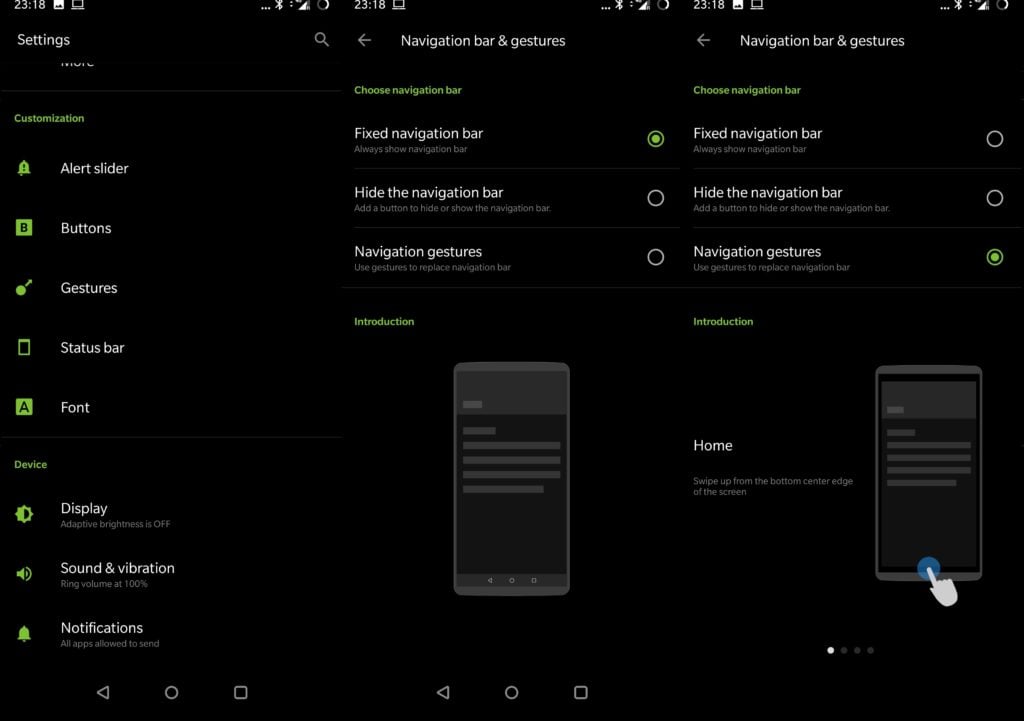
Like the iPhone X again, navigation gestures is a feature which lets you operate your phone with fluidity and smoothness while enjoying a larger screen real estate. Users can do this by hiding the navigation bar from their settings. After heading over to Settings, users will need to go to Buttons and then tap on Navigation bar & gestures. Here on they can tap on the third option and turn off the navigation bar. Although, the absence of the navigation buttons take time to getting habituated to the full-screen effect sure makes up for a modern design.