Support Telecomtalk







Andrew Bonwick
Vice President of Product Development at Relm Insurance

Madhav Sheth
CEO of Ai+ Smartphone

Stephen Rose
CEO Render Networks




Instagram has been keen on rolling out new updates these days. Soon after rolling out the IGTV stand-alone app, now the Facebook-owned company is all set on launching the music update. Using this new functionality, Instagram users will be able to add music to their Instagram stories. Previously, users used to do this by playing the music in the background or by streaming the music in Spotify or any other application. Now, they won’t have to go out of Instagram in order to add music to their Instagram stories. The update was announced on June 28th, and it is slowly being pushed to the users.
- Make Telecom Talk My Trusted Source






To make sure that you have the feature you will have to first update the Instagram application on your phone. After you’ve done that follow the below steps to add music to your stories.
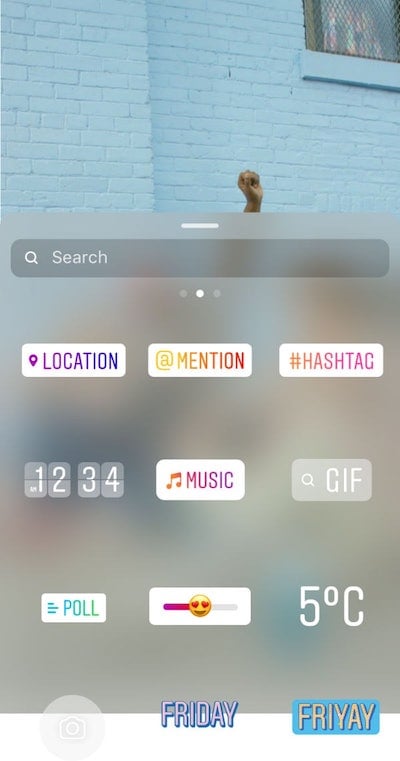
Tap Music sticker after recording a video or taking a picture
When you tap the Music sticker in the slider, Instagram is going to allow you to choose from its library of Music. If you are on iOS, you will even be able to go to the Music format even before recording the video or snapping the picture, and thus you will be able to add music beforehand.
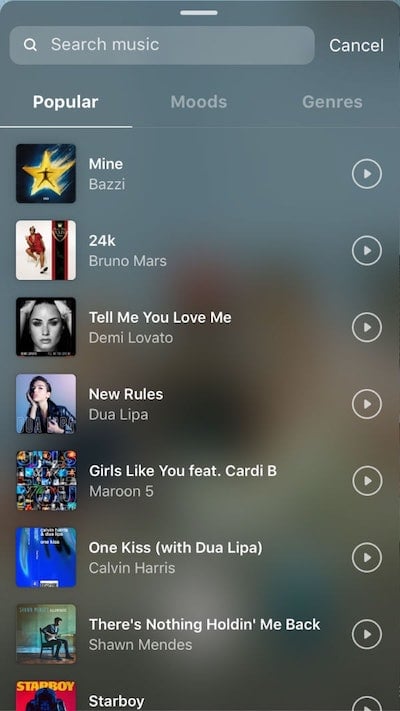
Swipe through the library of songs
Users will be able to swipe through the mood, genre or they will even be able to search for their desired song. Initially, there might not be many songs of their choice in the library, but it is expected that the Instagram music library will continue to grow with time. It is safe to say that Instagram will avail all the popular tracks on the platform for stories.