 Support Telecomtalk







Andrew Bonwick
Vice President of Product Development at Relm Insurance

Madhav Sheth
CEO of Ai+ Smartphone

Stephen Rose
CEO Render Networks




You would have noticed different symbols appearing on your smartphone or tablet’s status bar at different times such as G, E, 3G, H and H+. Ever wondered what do they actually mean? Many readers have been asking us their exact meanings and why those symbols keep on switching. I have created a small table which explains the meaning of all these symbols.
- Make Telecom Talk My Trusted Source



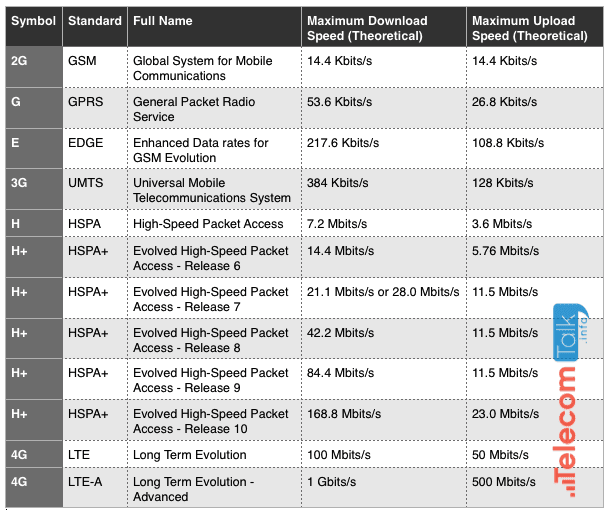
Note 1: 8 Bits = 1 Byte. Hence, you need to divide the above speeds (displayed in bits/s) by 8 to get the speeds in KB/s, MB/s or GB/s.
Note 2: HSPA is further divided into HSDPA (download) and HSUPA (upload ) to denote download and upload speeds respectively.
Note 3: Also, all these download and upload speeds are just theoretical maximum limits and not indicative of the actual real-world speeds. Real-world speeds vary depending upon a lot of factors such as the QoS, signal strength and network congestion.
Some people read for free. A few choose to support. If you found TelecomTalk useful, you can help keep us running.






























