Support Telecomtalk







Andrew Bonwick
Vice President of Product Development at Relm Insurance

Madhav Sheth
CEO of Ai+ Smartphone

Stephen Rose
CEO Render Networks




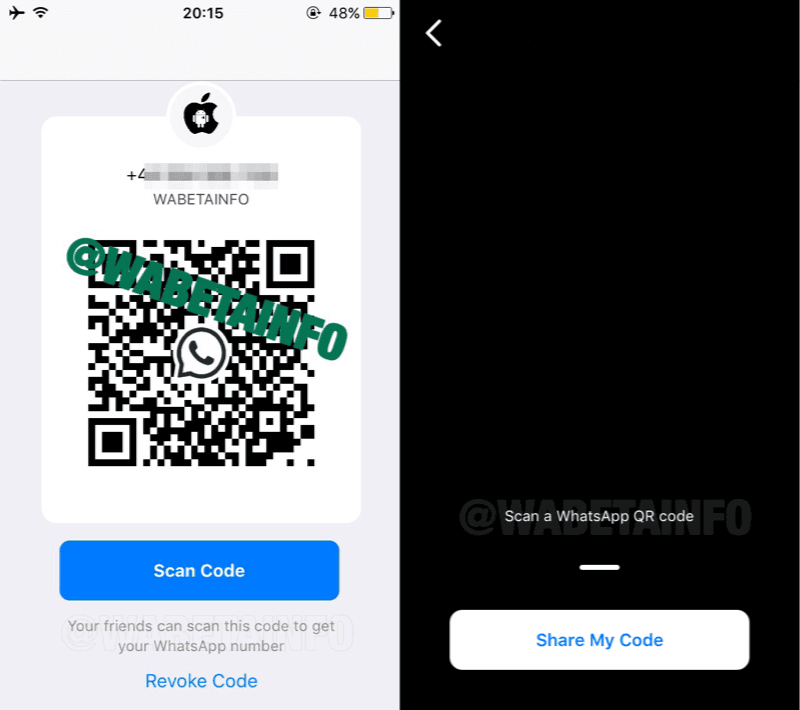
2018 has been a big year for WhatsApp as the instant messaging giant has introduced plenty of new updates, features and is still on the roll. Also this year, we got to see WhatsApp founder, Jan Koum leave the company after which the Facebook-owned company rolled out more and more new features. There is yet another update about a new WhatsApp feature which concerns the contact adding and sharing functionality. These two new features are currently in testing, and when rolled out they will allow the WhatsApp users to quickly generate a QR code for their contact information using which, other WhatsApp users will be able to add it to their contact list.
- Make Telecom Talk My Trusted Source






Sharing Contact Info Via QR Code Feature
Like always, this new scoop about WhatsApp’s latest feature has been picked up by WABetaInfo. As per this new update, WhatsApp will be adding a new “Add Contact” UI to its application alongside the QR code feature. This new feature will allow the users to enter the country code and mobile number of any person after which it will inform whether that particular number is on WhatsApp or not. Further, the user will be able to add that specific contact to their WhatsApp contact list.
Not only this, but WhatsApp is also testing the sharing contact via QR code functionality which will allow the users to save a contact on scanning a code. WhatsApp users will be able to generate a QR code with their contact information and users will also have the ability to revoke the QR code thus controlling their data. This way, WhatsApp will ensure the privacy of the users who generate QR codes. As per the report by WABetaInfo, WhatsApp is betting big on this feature for its business-oriented WhatsApp Business app as businesses have a significant public reach and the need thereof. Currently, the feature remains in testing for both Android and iOS.