

Yes, what you read is right “Now get paid in the form of Recharges for what you listen as your Ringtone on your Android. I’m talking about an innovative Android App called “RingAd – Free Recharge “ exclusively for India and also proud to say that this app is MADE IN INDIA by Shree Kant and team.
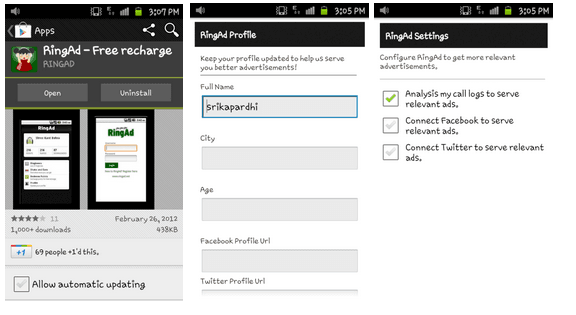
All you need is head over to Google play store, search for RingAd app, download, install and create an account to store your points. The rest of the work will be taken care by the App itself. This App is very easy to understand as the UI is very simple.
It runs in the background, downloads add tones to your Device Memory and plays the selected ad tones every time you receive a call so that a point gets added to your account for every unique ad tune played which can be later converted into a recharge after accumulating certain points. You also have got an option to choose which ad tone to be played or delete selected ad tone that you don’t want to play as a ringtone.
Trust me, this app doesn’t consume a lot of resources nor drain away your battery by running in background. Interestingly the data required by this app to download the ad tones is also less. So, no need to worry about both data as well as resources and by the way the ad tones don’t sound too much like ads that we listen elsewhere, they are a bit interestingly musical too. In fact I loved the RingAd app Ad tone and hope you too.
Live Ringtones for the first time in world as there are also dedicated pages in this app for your profile so that you get customized ad tones depending on your age, city and you have also got options to analyze your call logs or connect your social accounts.
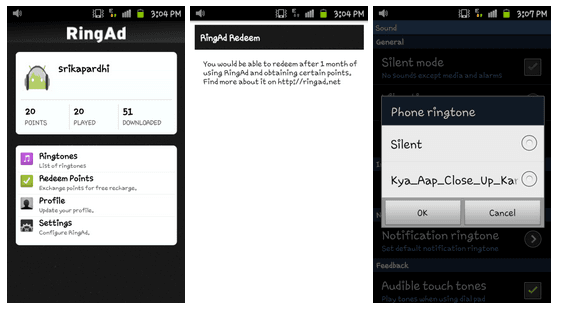
What i felt can be improved:
After the installation your default system ringtones will temporarily disappear, you will not have access to those tunes to set them manually when you feel like and you will be forced to select from those ad tones in the list to set as one of your tunes which I felt somewhat embarrassing in certain situations. There should be an option to activate and deactivate the service in the background or make the default ringtones visible in settings so that in certain situations without uninstalling the app we can set a ringtone of our choice and manually trigger the app back to its working state later.
Finally, this is an interesting as well as an innovative app that definitely needs a try on your Android.Please don’t forget to share your experiences here once you get some recharge amount!


hitesh June 3, 2012 at 2:37 pm
how can i redeem points…????
Kripanshu May 15, 2012 at 6:12 am
How much time will it take to give me my recharge
Shree Kant April 19, 2012 at 5:08 pm
@Sami
We don’t share any information to anyone other than the information required to tell them about the number of impressions their ad made. Your profile is optional to fill, so you can totally opt out to fill it.
Sami April 19, 2012 at 6:24 am
To the Maker of the App. You mentioned that our privacy is your priority. However, you didn’t told us will you be using our data/information for any purpose or share it with anyone else. If yes, what kind of information will be used/shared and why?. Waiting for your reply. If I don’t get a response from the maker, it will confirm that this App is not wroth the trouble and a major concern to the security/privacy of the end user.
Jack April 17, 2012 at 10:39 am
Downloaded & Installed it on my Android with my eyes closed —-” Trust Telecom Talk to have done all the required checks before publishing it here “
Farhan April 16, 2012 at 11:43 pm
bro,i m not getting any points,even though i received calls…
and how much one point means
Shree Kant April 16, 2012 at 4:15 pm
@Wangsuk Dapru
Thanks a lot! We hope to live upto expectations!


Wangsuk Dapru April 16, 2012 at 3:52 pm
@Shree Kant Great App Shree Kant…very innovative thought…way to go…
quicknol April 16, 2012 at 2:02 pm
@Shreekant,
Yes that’s nice, i wish you all the best for your Ringad.. I hope i will see the same in my iPhone soon
Shree Kant April 16, 2012 at 1:48 pm
We are getting constant reports regarding default ringtones being removed. Here’s how to get them back – open ringad and tap on Ringtones, then tap on browse button and go to folder -> System->media->audio->ringtones and there you will find all your ringtones. Tap on all ringtones you want and then tap on done and then tap on save. All your ringotnes are back. We will improve this system soon.
Shree Kant April 16, 2012 at 1:33 pm
@quicknol
Hey, thanks for appreciation! It’s currently not available for iphone, we are in a very early stage to think about it.
quicknol April 16, 2012 at 1:22 pm
RingAd interface is super, is it available for iPhone?
Shree Kant April 16, 2012 at 12:43 pm
@Vivek Mittal
Vivek, it may take some while before we release Nokia app. We want to totally focus on Android and prove the idea and business model.
Vivek Mittal April 16, 2012 at 11:51 am
@Shree Kant
By when can we expect this app to be available for Nokia Symbian 60 series phones? Will you be developing this app for Symbian 60 and Symbian Anna or you dont have any such plans?
Shree Kant April 16, 2012 at 10:37 am
@lokendra
Make sure those are not missed calls, you can’t get points for missed calls.
lokendra April 16, 2012 at 8:42 am
@Shree Kant
i have download the app and listen 4 tone but it is not showing any points.
Bibhudutaa Panda April 16, 2012 at 7:28 am
FAKE..
Shree Kant April 16, 2012 at 5:24 am
@agent vinod
You can redeem points after every 1 month, you can redeem whatever points you have.
Shree Kant April 16, 2012 at 5:23 am
@Vivek Mittal
No, it’s not availble for Nokia yet.
Vivek Mittal April 16, 2012 at 2:28 am
@Shree Kant
Have you also developed this app for the Nokia
agent vinod April 15, 2012 at 11:50 pm
when we get recharge ? i mean how many points needed ? what is the maximum amount of a recharge ? thank you.
@Shree Kant
epynic April 15, 2012 at 9:43 pm
to make extra points ,. Any one can,. manipulate + ringtones played
,.,
Shree Kant April 15, 2012 at 8:32 pm
I am founder of RingAd. Thanks for nice write up, really appreciate it. About the concern regarding the default ringtones, it is due to the limitation in the android device, which doesn’t allow too many tones as ringtone. Your default ringtones are always there, you can set them by clicking the ringtone menu in RingAd and then browsing them.
I also want to assure readers about the privacy concerns, we would always respect it and your data safety is our highest priority.
Please feel free to ask me any further questions.
yuvraj April 15, 2012 at 6:58 pm
it’s time to make some bucks…
epynic April 15, 2012 at 2:48 pm
safe , privacy concern ?
Gopal Chugh April 15, 2012 at 2:20 pm
That sounds cool
Jack April 15, 2012 at 2:17 pm
Very cool app…