 Support Telecomtalk







Andrew Bonwick
Vice President of Product Development at Relm Insurance

Madhav Sheth
CEO of Ai+ Smartphone

Varun Kashyap & Sridevi Reddy
Co-Founders, Zithara.ai
Transforming Indian Offline Retail and Customer Engagement Using AI


Most of you must have saved Google Maps for offline use in the past, but then Google removed that feature from its apps. Earlier this year, the search giant announced during Google I/O 2015 that it would bring back the option to save maps for offline use with an update to Google Maps.
- Make Telecom Talk My Trusted Source



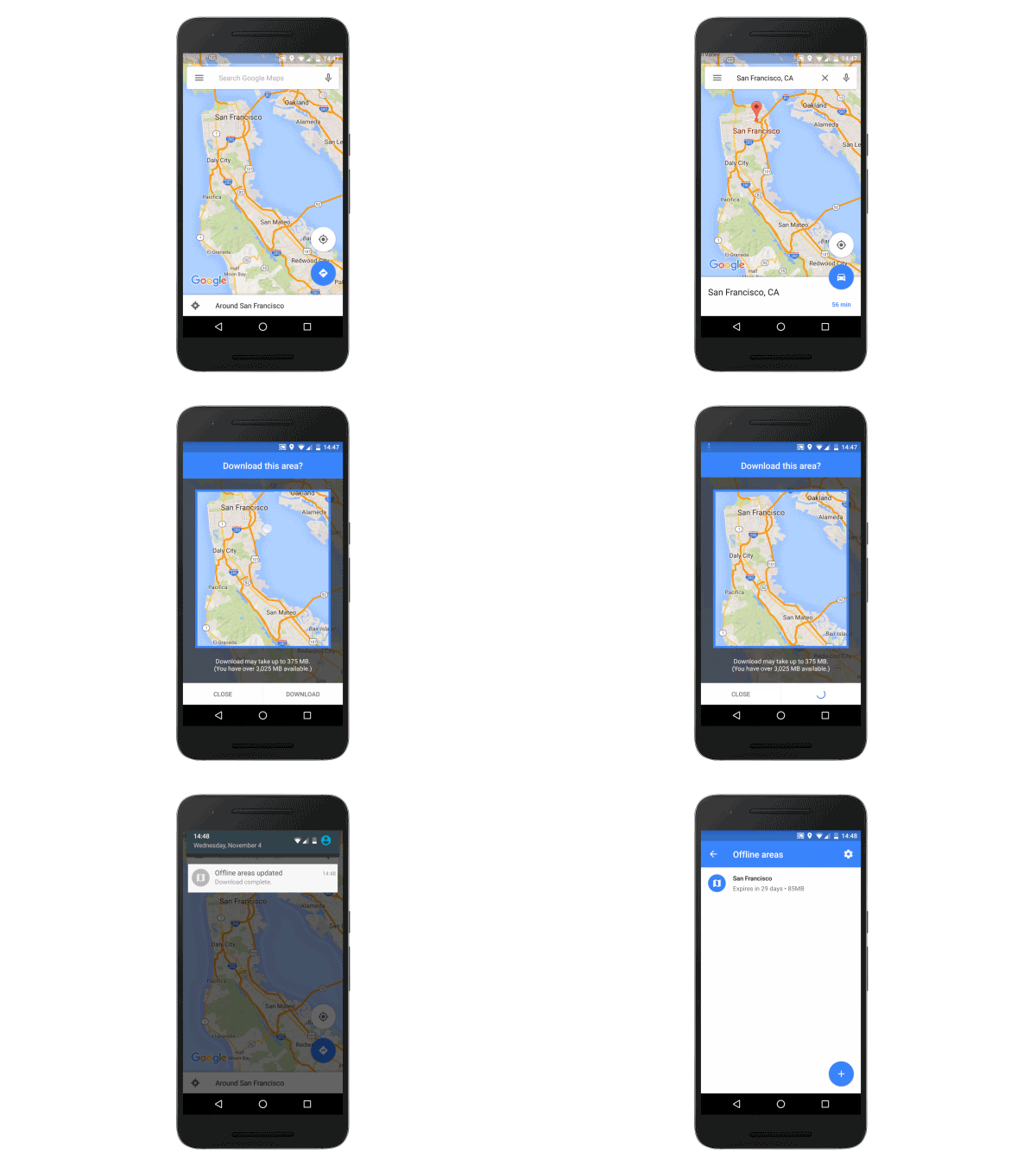
Today, it has done so, and you can now save an area on Google Maps for offline usage where you know that there won’t be cellular connectivity. The update is rolling out for Android users now, and an iOS update will be released in the future.
This feature was available 2-3 years ago, and then Google brought it back. This goes on to say that it is destined to stick around, especially since Google started focussing markets like India and some other developing nations where cellular connectivity isn’t consistent. To use this feature, you’ll need to update the Google Maps app to the latest version (which is rolling out now). When you search for an area or a city, click on the search result, and download the area by pressing the ‘Download’ button in the information page.
A small group of TelecomTalk readers helps keep this platform running. Support us if you find our work valuable.






























