 Support Telecomtalk







Andrew Bonwick
Vice President of Product Development at Relm Insurance

Madhav Sheth
CEO of Ai+ Smartphone

Varun Kashyap & Sridevi Reddy
Co-Founders, Zithara.ai
Transforming Indian Offline Retail and Customer Engagement Using AI


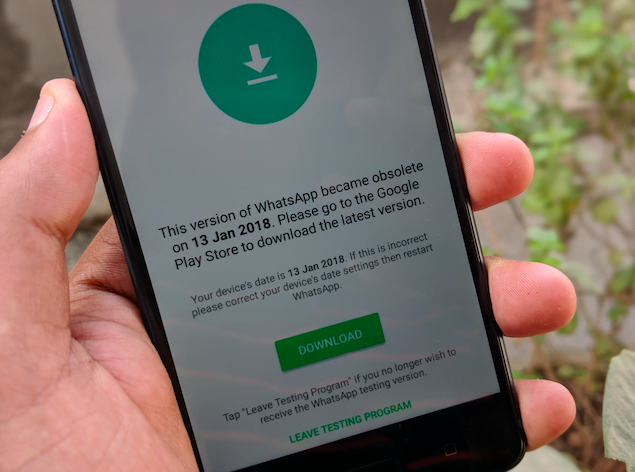
WhatsApp is again in the news yet again but this time for bad. The Facebook-owned company which is introducing new features every day has now reportedly stopped working on a few phones with an error- “This version of WhatsApp became obsolete on 13 Jan 2018. Please go to the Google Play Store to download the latest version.” However, when the users hit the update button it redirects to Google Play Store, but there is no update available for the application.
- Make Telecom Talk My Trusted Source



A quick workaround for this is to install the application manually by downloading the latest version from the official WhatsApp website. To download the latest WhatsApp APK, head over to WhatsApp.com/android, and hit the download button. Install the downloaded application which solves the issue. Make sure that you have enabled the ‘Allow installation of apps from unknown sources’ option under Settings on your smartphone.
Another thing you should make sure is to backup your WhatsApp chat, which can be done by heading over to WhatsApp Settings>Chats>Chat Back> and hit the back up button now.
Uninstalling the application and reinstalling it from Google Play Store is not the solution according to various users who reported the issue. Also, the problem is reportedly faced by many Xiaomi smartphone users. In fact, Xiaomi even posted an official fix for the issue on its MIUI forums, which explains the entire scenario of how many Xiaomi smartphone users affected by this issue. To be noted, I also encountered the same issue on my Redmi Y1, and I tried this method which worked out.
Furthermore, the update obsolete error screen suggests that the issue is in the beta version of the application. And it shows a ‘Leave Testing Program’ button at the bottom of the error screen, but when clicked on that button, it just takes to the Google Play Store screen. The sad part, however, is that WhatsApp users not on the beta program are facing this issue.






























