

App Review : Z1 Contacts Backup Restore – One Click Contact Backup App for Android Smartphones

Contacts being the most important information in any mobile device are always hard to keep safe and backed up continuously without our intervention.Every now and then we come across embarrassing posts by some one or the other in social Networking sites saying – “I lost my phone or contacts please  SMS me your Numbers with names”. 
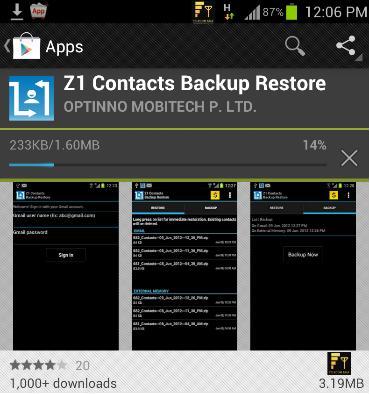
So, Pune based mobile app company- Optinno Mobitech, has launched an innovative solution for the problem. Optinno’s new app- “Z1 Contacts Backup Restore ” automatically backups up contacts in the background so that the next time you won’t feel bad when you lost any of your contacts.

The app works on a Patent Pending technology that automatically backs up the latest contacts in a separately created folder in Gmail and provides an option to restore those contacts back in phone in 1 click and so the name Z1.

You can even download the backup attachment from Gmail which is in zip format on you PC and work on contacts with various Address book softwares since the contacts are stored in .vcf format.

You can ask My Android automatically keeps the contacts in sync with Google contacts and whats the use of this App?

Your Android sync the contacts to Google contacts, but the problem is it mixes up the Gmail (email) contacts and phone book contacts, making it much complicated and messy to manage. Now, with this app you can automatically backup all the phone book contacts.
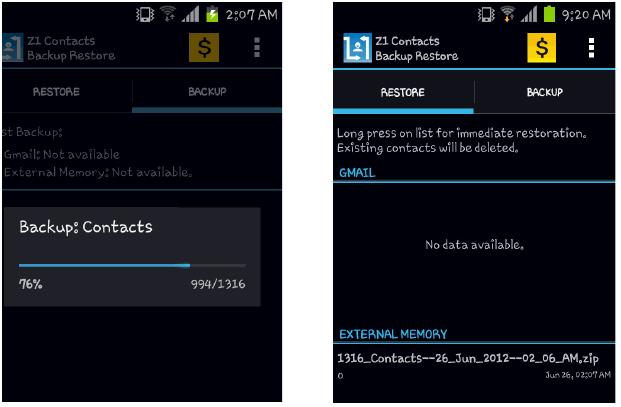
So to start working off with the app just download it from Google Play Store and install .This app will automatically backup all the latest contacts in .vcf format packed to a zip for every new backup event along with contact picture which is an amazing feature of this app and stores the zip file on the SD card.

If purchased the premium version and connected to Internet while enabling IMAP in your Gmail this zip file is automatically backed up to cloud ie to your gmail account which is linked. This way you can restore when ever you feel like from any of the last 5 backups shown up in the application interface as the Zip file is saved with a name showing the Number of contacts backed up.

So, you really don’t need to worry about loosing your contacts even thought you lost your phone as they are backed up into your gmail if you are using a premium version. During our usage the app handled a large number of contacts pretty easily with out any device hangs. You can also use it easily and comfortably as the resources used by the app are also negligible while running in the background.
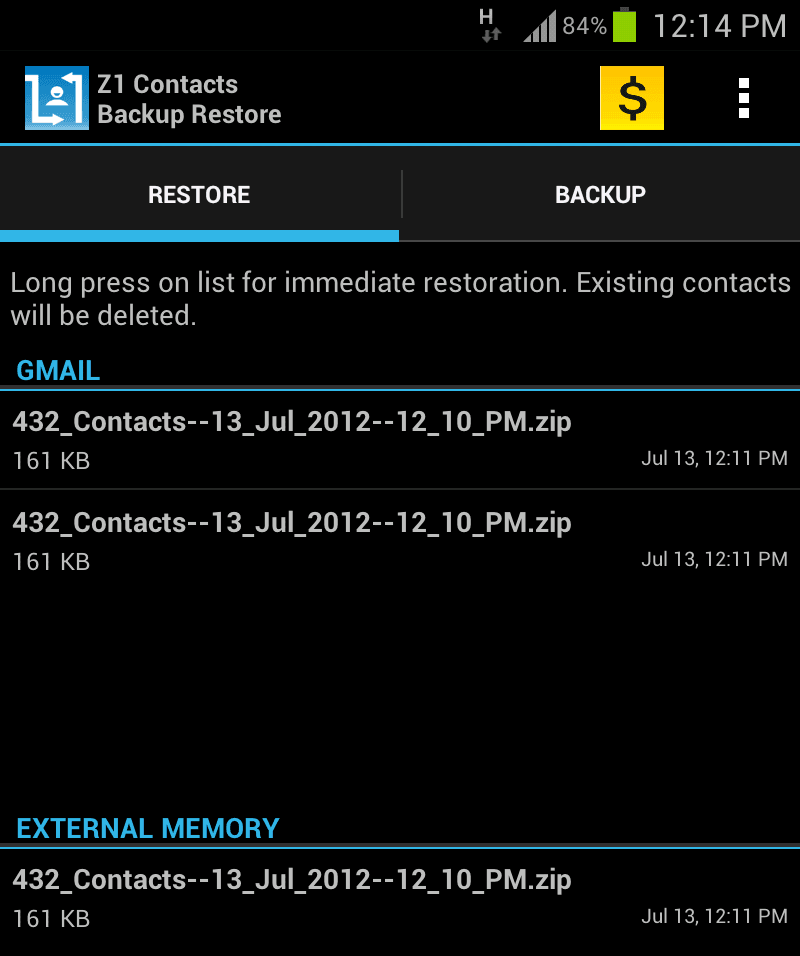
Please be noted that a single click on the Restore contacts option will delete your entire contact list present and update with the contacts with the latest backup event done. Don’t try to stop any of the on going backup or restore process in the middle as this would disturb the process resulting in loss of contacts. The old contacts are deleted before restoring any backup only to avoid sync or any other issues.

This is all an automated and hassle free solution to backup and restore the phonebook. The Android 4.0 – Ice Cream Sandwich UI theme makes the app modern looking and cool. Currently the app is available on Android and available as free app. You can try the Premium features for free for 30 days. After that the app will still backup the contacts but only on the SD card. The devloper Optinno Mobitech plans to launch this cool app on other platforms soon.

This app is worth a try for Android users with No continuous Internet connection running in the background and a good application that one should have with a running Internet connection to get their contacts backed up regularly to cloud.

Direct link to downlaod this app from Google Play App Store – https://play.google.com/store/apps/details?id=com.z1contactsbackuprestore

This Article Was Written By: Srikapardhi

Srikapardhi - Customer Data Analyst / Senior App Reviewer

An Electronics & Communication Engineer who love to play with mobiles & apps.

{ 16 comments… add one }

Leave a Comment

*

  • Prithvi July 18, 2012 at 4:41 pm

    @rahulraj
    Noted, but all OS’es have different modes to recognise the contacts. For e.g., Symbian takes in one contact at a time. This becomes cumbersome to transfer contacts and not all users will have gmail id’s. The transfer should be devoid of need to have Outlook/Email id’s – a completely independent process to transfer contacts.

    Reply
  • rahulraj July 18, 2012 at 4:11 pm

    Prithvi :
    @Sagar Bedmutha
    Thank you for clarifying. Would this be useful for users who wish to transfer contacts between other platforms to-fro from Android to Symbian 40/60 or Windows Phone OS or iOS and back? This is the key for ordinary users more than just having everything revolve around Android.

    if I was in need I wl export all the contacts to memory card,another way is to copy d contacts in sim card dn paste it on ur new phone,though the second option is a bit tideous…

    Reply
  • Prithvi July 16, 2012 at 12:45 pm

    @Sagar Bedmutha
    Thank you for clarifying. Would this be useful for users who wish to transfer contacts between other platforms to-fro from Android to Symbian 40/60 or Windows Phone OS or iOS and back? This is the key for ordinary users more than just having everything revolve around Android.

    Reply
  • Sagar Bedmutha July 16, 2012 at 10:29 am

    Hello All,
    Google Sync does backup the contacts, but most of the android users do not use it, as they find it too complicated to use and mange the contacts after sync. We are targeting such ‘non-tech-savyy’ android users- think you dad or Sis or non-techy friend: they might be using android phone, but do they use sync and all??

    Hope this clarifies the utility.

    Regards,
    Sagar Bedmutha

    Reply
  • Jignesh chotaliya July 13, 2012 at 9:26 pm

    company has wasted time developing this

    Reply
  • Prithvi July 13, 2012 at 6:46 pm

    @aks
    I also agree with this. There is no need for such an app AT ALL. What we need is an app that can seamlessly transfer contacts without duplication to other platforms – a cross-platform app for contact back-up. This is what everyone needs. Today if you shift from Symbian S40 to Android, there is no easy way to do it.

    Reply
  • aks July 13, 2012 at 4:43 pm

    it is just a crap.. for ram blocking…

    Reply
  • aks July 13, 2012 at 4:43 pm

    Aatif Sumar :
    I don’t get the point of this app. Android syncs all your contacts on Google’s servers. Also, every Android device has an option to ‘Display Only Contacts With Phone Numbers’, so your email addresses dont crown your Contact Book. With that backing up your contacts in real time, what’s the point of Z1 Contacts?

    absolutely correct… bro…

    Reply
  • Ashish July 13, 2012 at 4:34 pm

    No need of such type of apps ….we can also take the backup of contacts on our pc or on email account….

    Reply
  • dev July 13, 2012 at 3:14 pm

    @Rahul
    can u please explain where excatly i can found this option of merge.

    Reply
  • Aatif Sumar July 13, 2012 at 2:32 pm

    I don’t get the point of this app. Android syncs all your contacts on Google’s servers. Also, every Android device has an option to ‘Display Only Contacts With Phone Numbers’, so your email addresses dont crown your Contact Book. With that backing up your contacts in real time, what’s the point of Z1 Contacts?

    Reply
  • Srikapardhi July 13, 2012 at 2:30 pm

    @Prithvi
    Yes, you can make a backup first, get the zip file, unzip it and the contact files can be used to transfer to other platforms using their respective contact softwares.

    Reply
  • Rahul July 13, 2012 at 2:26 pm

    Well one suggestion…

    You don`t need any app to do this… Just enable contact backup in account and settings in Android.

    First time just go to contacts and merge all with google.. thats it next time when you make a new contact you can directly save to your choosen google account.

    Remember all these contacts are accessible via Gmail > contacts

    Reply
  • novicefreak1 July 13, 2012 at 2:15 pm

    Good to know abt this software.

    How to sync all the contacts from nokia symbian platform to say iOS. Is there any special app for nokia S40 phone which does this job?

    Reply
  • Rajiv July 13, 2012 at 1:56 pm

    Z1 Contacts Backup Restore is one of the best and must have app for android phone.


    Reply
  • Prithvi July 13, 2012 at 1:28 pm

    Can this be used to transfer contacts on other platforms like Windows, iOS, BB or Symbian?

    Reply

Next Post:

Previous Post:

Send us your PR, news and tip-offs:

Email: news@telecomtalk.info

Subscribe for updates

Critics/Analysts

Tharun George l Sudhakar

Saurabh l Ganesh Srinivasan

SS l SD l Esmail l Kaushik Roy

Search

Recent Comments

  • Loading...