


Ways To Prevent SIM Card Misuse

Gone are the days when someone used to steal our phones for the purpose of just a phone.

Ways To Prevent SIM Card Misuse

Yesterday when I went to a BSNL Regional Office for replacement of a defective SIM (Subscriber Identity Module) I came across an incident where a Customer is complaining to block his SIM as a thief who has stolen his 20 thousand Rupees phone left away his phone and took away only the SIM with him.

Now the customer is worried what the misshapen might happen. Though the complaint has been taken and recorded I asked the CC if really the SIM will be blocked?

The answer is “They get hundreds of SIM lost cases daily and if they keep on blocking the SIMs it wastes them a lot of time and resources also some mischief people might falsely complain and try to block other people numbers incase if they know their details. So, we don’t usually”.

Imagine what will be the condition of the customer who lost his SIM, phone or both and the same SIM is found to be used in a Bomb blast, harassing a girl/boy or any illegal act? Who would the police suspect or responsible for this?

Although the police, SIM Vendors and the Telecom Companies are trying their part we want our TT readers never to face such problems and this Post is dedicated to every mobile user who is reading and we strongly encourage our readers to spread the word till every Indian Mobile user locks their SIM cards and keep safe.

To start off we need to know a few technical terms:

1. PIN or PIN1 (Both are same, shows up depending on your mobile -Personal Identification Number)

2. PIN2

3. PUK/PUK2 or PUC (Both are same)-PIN Unblocking Key/Code for PIN/PIN2

4. SIM Number – The SIM card’s Number comprising of 19 Digits or even Letters sometimes is your unique SIM number printed on backside of SIM card often required to give information for PUK enquiry/Theft/lost damaged purposes.

The Personal Unblocking Key (PUK/PUK2) code is an eight digit code specific to your SIM card (Not Mobile Number) and is required when the PIN/PIN2 code is entered incorrectly three times on your mobile.

You’re given 10 attempts to enter the PUK code once you finish your 10 attempts after the 3 PIN attempts your SIM card will be blocked permanently and become useless .You can no way use it thereafter.

A PIN is used to just lock/Unlock the SIM card whenever you switch on/off your device or change your Mobile, So that you can prevent unauthorized use of your Number. Only the person who knows the PIN number of your SIM can only unlock and use it.

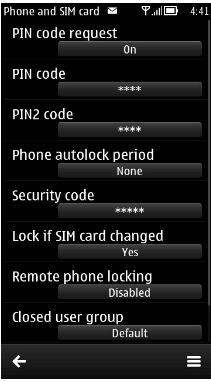
So, we encourage all our readers to enable PIN Code request on feature in your devices so that you can stay peaceful whenever you lost your phone/SIM.

The default* PIN number for most of the operators will be 0000 or 1234.You can find the PIN code request feature in the device security settings. You need to change the default PIN numbers to your choice so that no one can unlock the SIM.

But most importantly, when changing your PIN codes make sure you remember because you are the one who changed it and expect no help from operators. They can only provide you with a PUK code in such cases as you changed its default Code.

If  you on/off your device regularly you might feel the pain in entering the PIN but it’s better to be on safe side before anything bad happens. I also warn you to inform about this Security feature if activated and in case if you are giving your mobile to your friends or relatives for temporary use so you can prevent their PIN wrong attempts.

Coming to PIN2 this is a feature which even the Customer care people of the Telecom Companies are not aware of. Using PIN2 you can restrict the Numbers to which you can make calls i.e. enabling FIXED DIALING. So that you can even give children a phone without being worried with whom they are talking by only enabling parent’s numbers in the FIXED DIALING option.

Unfortunately the Telecom Companies are not encouraging this wonderful feature. Don’t know if they are really not aware of or they don’t want users to use it.

Whenever I called and asked the CC representatives about PIN2 or PUK2 they say “Sorry Sir, there is No feature called PIN2 or PUK2 we have and can only provide PIN or PUK number for your simcard.”

As if I am a dumb person they also informed me that PIN2 or PUK2 is something related to Mobile Device Manufacturer and not to Telecom Operator and oh, thanks to their advice.

Now TT Readers I strongly say PIN/PIN2/PUK/PUK2 are all related to a sim card and only to Network Operator.

And oh I’m happy with my BSNL and AIRTEL (Not tried to risk with the rest as I already blocked my TD SIM PIN2) Numbers* as they have their PIN1and PIN2 default codes same so that I can use FIXED DIALING and at the same time lock my SIM when lost.

*Note: Dear Readers you SIM card (BSNL/AIRTEL) might not have the same PIN/PIN2 codes as I have mentioned my experience and try it at your own risk TelecomTalk will not take any responsibility for your wrong doing .

Check default PIN numbers with your operator.

Luckily even if your PIN2 blocks and you have not entered PUK2 nothing happens to your SIM services, you can still enjoy services on your SIM. The only disadvantage is you will not be able to use Fixed Dialing feature unless PUK2 is entered.

I hope at least now after reading this article Telecom Operators provide PUK/PIN2/PUK2 codes in their Self-care portals or services.

We now would like to know if anyone has tried the PIN/PIN2 features and what are your personal experiences do share your views via comments ?

This Article Was Written By: Srikapardhi

Srikapardhi - Customer Data Analyst / Senior App Reviewer

An Electronics & Communication Engineer who love to play with mobiles & apps.

{ 56 comments… add one }

Leave a Comment

*

  • Kishan March 9, 2013 at 9:10 pm

    TRAI should take effective steps to prevemt unauthorized use of SIM card….!

    Reply
  • Sanjay September 4, 2012 at 1:29 pm

    TRAI should take a step against the distributor of reliance (friend infocom,khatra,dist-bankura,W.B.Ph 09333333777).who without inform to customer replacement sim and use.exam 8509102220,8509102229 this replacment and use by distributor without customer permition.

    Reply
  • Deep February 19, 2012 at 7:39 am

    as for BSNL usually d default PIN is 0000. U may obtain both PIN n PUK from CC or nearby CSC after verifying ur authenticity.

    Reply
  • sahil February 16, 2012 at 11:48 pm

    TRAI should take a step against the operators for not allowing to have all the security info (like PUK code). As we have the right to have the PUK code.

    Reply
  • sahil February 16, 2012 at 11:42 pm

    Really, I have asked my service provider for the PUK code. But they didn’t give me. I think TRAI should take step for this type of security reasons.

    Reply
  • aks February 14, 2012 at 6:54 pm

    rahulraj :
    SIRJI “PUK” STANDS FOR “PIN UNBLOCK KEY”

    No friend, “PUK” STANDS FOR “PERSONAL UNBLOCKING KEY”

    Reply
  • aks February 14, 2012 at 6:51 pm

    Srikapardhi :
    @rahulraj
    Exactly, wondering how that typo mismatch occurred. a blunder i can say and agree.
    May be i missed that even in my final checkup,Might be a mistake while re editing

    Bro,don’t apologize.You are already correct.“PUK” STANDS FOR “PERSONAL UNBLOCKING KEY”

    Reply
  • Srikapardhi February 14, 2012 at 2:36 pm

    @rahulraj

    Exactly, wondering how that typo mismatch occurred. a blunder i can say and agree.
    May be i missed that even in my final checkup,Might be a mistake while re editing :(

    Reply
  • rahulraj February 14, 2012 at 1:06 pm

    SIRJI “PUK” STANDS FOR “PIN UNBLOCK KEY”

    Reply
  • anuj February 13, 2012 at 9:48 pm

    It has happened twice that my mobile was stolen and I asked CC (Airtel) to block immediately. They did so after cross checking by asking me full name, birth date, last talk time, validity, last recharge etc. After i answered, my SIM was blocked immediately. I could confirmed this because when i dialed my number, it said service is temporarily suspended to this no. And got new SIM replaced with same number. In 2009, they took 100Re for that, last year they took 25Rs but service provided by them was quick and satisfactory.
    But I will still try this PIN method to ensure more safety.

    Reply
  • gvnaidu February 13, 2012 at 9:21 pm

    While trying security code, I got my sim card once permanantly blocked. After reading the above article I carefully set my pin. The default code for idea is 0000. I am using pin security at present.However I donot need any security code for my personal use. It can easily be blocked or unblocked at my place, by contacting the service center No need to call custosmer care.

    Reply
  • Ravi February 13, 2012 at 8:27 pm

    aks :

    Pratik :

    steve :
    TT This is not a full proof solution.as the puk code is easily available from the operator .all the retailers can get the puk within seconds by just single sms.there is no verification nothing from the operators side

    @aks
    I think,
    It’s not possible to unlock sim with PUK number only.
    If you finish all attempt of your PIN Code, than your phone ask for PUK.
    In PUK you need to Enter PUK given by the operator + Your Pin Code. To unlock the SIM ( PUK(8 Digit) + PIN(4-6 digit as given by you) = Total (12-14 digit Code) ).

    Once you enter PUK code,the SIM will ask you to enter NEW PIN. Its not compulsory to enter your OLD PIN . You can enter any new PIN after entering PUK code.

    Exactly.

    Reply
  • aks February 13, 2012 at 7:36 pm

    Pratik :

    steve :
    TT This is not a full proof solution.as the puk code is easily available from the operator .all the retailers can get the puk within seconds by just single sms.there is no verification nothing from the operators side

    @aks
    I think,
    It’s not possible to unlock sim with PUK number only.
    If you finish all attempt of your PIN Code, than your phone ask for PUK.
    In PUK you need to Enter PUK given by the operator + Your Pin Code. To unlock the SIM ( PUK(8 Digit) + PIN(4-6 digit as given by you) = Total (12-14 digit Code) ).

    Once you enter PUK code,the SIM will ask you to enter NEW PIN. Its not compulsory to enter your OLD PIN . You can enter any new PIN after entering PUK code.

    Reply
  • Arsh February 13, 2012 at 6:48 pm

    My personal experience with airtel is that they lock he SIM immediately upon request but they do ask for approx last recharge amount and date,and as per friend reports all private operators do it,maybe BSNL does not or maybe the person at the office was not aware and just answered to give you an answer.

    Reply
  • Jain February 13, 2012 at 6:40 pm

    @S.A.Rahman
    I am not a hacker..okey? I tried the steps mentioned in my last posts to get new PIN on many of my sims before 1 year & I was succeeded in that, on that time.so I lost the trust in PIN & PUK !! I will try the same with RCOM Gsm now & will let you know.. I don’t know operators introduced strict policies nowadays or not.. I remember when I was 15 years old, I entered postal pin code when my dad’s bsnl sim asked for PIN.. I managed to enter PIN 3 times & PUK 9 times to loose that number :-)

    Reply
  • Mallik February 13, 2012 at 5:54 pm

    @teletalk
    its available. Point to services at the top right corner of Tatadocomo.com click my account in the drop-down menu and register for new account. Then login in that account you can manage your account from there… It also includes barring of outgoing calls from your number in this account on the web.

    Reply
  • teletalk February 13, 2012 at 4:08 pm

    some time ago i try call baring facility on all prepaid sims and i found that all of facility is available on tata docomo sim like fix dialing number and call barring service but in idea airtel and vodafone have this service also but tata docomo win the race in some features

    Reply
  • teletalk February 13, 2012 at 4:04 pm

    @bharat
    dear bro i go to tata docomo site and i do as you say but there is no facility for sim blocking i have an account on this site but there no clickable menu on the site

    Reply
  • Srikapardhi February 13, 2012 at 3:24 pm

    As far as i tried default PIN AND PIN2 numbers for BSNL SIM Cards in AP Circle is 0000

    Reply
  • S.A.Rahman February 13, 2012 at 2:54 pm

    @Jain
    if you can provide phone no. With sim no. RGSM will give you puk

    Reply
  • rohit February 13, 2012 at 2:54 pm

    Anybody provide me pin2 of tata docomo & idea?

    Reply
  • Srikapardhi February 13, 2012 at 2:24 pm

    @Jain

    Thanks Jain for your comment,

    that is what i have said in my earlier comments.

    To elucidate much, PUK should not be available as easily as one can ask from CC without enquiring personal information like dob,RC amount,Place and all.
    Telecos should be aware of such small technical glitches.We will be covering articles keeping telecos also in mind and not only the Customer.
    Hope you understand.

    Thanks

    Reply
  • Jain February 13, 2012 at 1:00 pm

    & I was aware of PIN2 & PUK2 code & contacted many times operators on this regard & the reply was “They were not providing PIN2 facilities”.. Hope all the operators will enable PIN2 facilities.. !!

    Reply
  • Jain February 13, 2012 at 12:58 pm

    PIN Enabled Stolen sim cards can be used very easily
    1)If I got the Stolen sim card, I can get the 16 digits unique sim card no, that will be printed on the sim card itself
    2)Enter 3 times wrong PIN & block the PIN
    3)Mail/sms/ivrs these 16 digits sim card no to the corresponding operator & get the PUK code
    4)Enter PUK code & set new PIN code
    5)SIM Ready to use :-)

    So what security by enabling PIN on sim rather than irritation to type it in each phone restart :-) Telecomtalk.info please clarify?

    Reply
  • Mohan February 13, 2012 at 12:20 pm

    Here in Saudi Arabia, These details were provided in the same card which holds the Sim Card. Also you can use fixed dialling in both ways by calling the customer care and also in phone by using PIN2.

    Reply
  • Pratik February 13, 2012 at 12:00 pm

    steve :
    TT This is not a full proof solution.as the puk code is easily available from the operator .all the retailers can get the puk within seconds by just single sms.there is no verification nothing from the operators side

    @aks

    I think,
    It’s not possible to unlock sim with PUK number only.
    If you finish all attempt of your PIN Code, than your phone ask for PUK.
    In PUK you need to Enter PUK given by the operator + Your Pin Code. To unlock the SIM ( PUK(8 Digit) + PIN(4-6 digit as given by you) = Total (12-14 digit Code) ).

    Reply
  • bharat February 13, 2012 at 11:02 am

    Just to add to the above article, TATA DOCOMO allows users to set-up my-account services via internet. This set-up has a wonderful feature to block or unblock your sim card.

    i.e. if your phone(sim) gets stolen, just log-on to the my services section and block your sim-card. You can always request for a new sim, with the same number providing the necessary documentation.

    Reply
  • karann February 13, 2012 at 10:47 am

    PIN 2 CODE DETAILS :-
    airtel 4321
    vodafone 0000
    mtnl 0000

    Reply
  • vikrant February 13, 2012 at 10:40 am

    ya i am using PIN1 from last 10 years.. i had also asked about PIN2 and puk2 as i had blocked when i was trying to enable it.. but no one from customer care has provided information about puk2.. they said that what is puk2 or pin2.. we can only provide puk. They don’t know any information about pin2/puk2.

    Reply
  • AsitPaul February 13, 2012 at 10:39 am

    @Raaj
    You also need a Copy of FIR from local police station for your lost or stolen mobile and/or SIM to get a new replacement of SIM in our area.

    Reply
  • karann February 13, 2012 at 10:29 am

    Friends after calling customer care they told me PUK code, but my phone is asking for PUK 2 code? what shall i do? PUK CODE IS WRONG, IT SAYS 8 ATTEMPTS REMAINING… I know my PUK cODE, BUT NOT puk 2 code. please help… using Airtel delhi postpaid

    Reply
  • Arka February 13, 2012 at 10:24 am

    Very good analysis from TT for it’s readers. Thank you very much.

    Reply
  • Sougata Das February 13, 2012 at 8:54 am

    Guys, we can activate PIN & also the Phone lock code for the safely of the handsets

    Reply
  • Srikapardhi February 13, 2012 at 6:34 am

    @aks
    Yes, telecos should be aware of that.
    We are trying to bring a little awareness about SIM misuses.
    Hope you got my point.Thanks

    Reply
  • Srikapardhi February 13, 2012 at 6:26 am

    @steve

    Yes, i do agree atleast Telecos can trace which other number enquired for PUK of the particular lost SIM

    Reply
  • zeeshan February 13, 2012 at 6:06 am

    @Saurabh
    Default PIN2 of BSNL is 0000.

    Reply
  • Saurabh February 13, 2012 at 2:00 am

    PIN 2 details-
    MTNL Delhi- 0000
    Reliance Bihar/ Jharkhand- 0000
    But,
    For, Tata Docomo MP/ CG, it is not 0000.
    (As I found on all my SIM)

    Kindly share PIN 2 for other operators.

    Reply
  • Saurabh February 13, 2012 at 1:52 am

    Deep :
    I Love TelecomTalk.Info

    +99999999999999………

    Reply
  • aks February 13, 2012 at 1:34 am

    I always keep SIM PIN enabled on my all numbers. But this is yet not full proof solution as some operators provide PUK info without any verification.The only thing you have to know is the 10 digit number of that sim & CC will provide the PUK code. BSNL provide PUK without any verification & Vodafone provides on IVR. I appreciate Reliance in this concern,they atlest ask some info related to Name/address/PinCode of SIM owner before providing PUK Code. Don’t know about other networks. But enabling SIM PIN on your number always reduces the chance of misuse.

    Reply
  • aks February 13, 2012 at 1:33 am

    I always keep SIM PIN enabled on my all numbers. But this is yet not full proof solution as some operators provide PUK info without any verification.The only thing you have to know is the 10 digit number of that sim & CC will provide the PUK code. BSNL provide PUK without any verification & Vodafone provides on IVR. I appreciate Reliance in this concern,they atlest ask some info related to Name/address/PinCode of SIM owner before providing PUK Code. Don’t know about other networks. But enabling SIM PIN on your number always reduces the chance misuse.

    Reply
  • FAIZ February 13, 2012 at 1:26 am

    I am already using this PIN codes for security purposes since 8years or more…

    Reply
  • Raaj February 12, 2012 at 11:10 pm

    how about requesting for a replacement sim (sim swapping)when one looses his mobile or for that matter sim?only id proof and address proofs are required.And you will get your sim very soon for a nominal charge from your operator.sometimes you might need to show the copy of the FIR you have lodged with the local police station where you might have reported the mobile and sim loss.Two advantages for doing this–
    (1)Your no stays with you
    (2)And no one can misuse your no,coz same no can not be active on two sims right?

    Reply
  • S.A.Rahman February 12, 2012 at 10:56 pm

    Telcos knew all about Pin2 but they will never accept and provide unless forced to do by telecom law.

    Reply
  • Debasish Mitra February 12, 2012 at 10:40 pm

    Great Job done by telecomtalk team…By sharing this article.
    But normally people in India don’t take seriously about Sim/information Security.
    Much more awareness needed…

    Reply
  • singh February 12, 2012 at 10:17 pm

    Nice share….

    Reply
  • Abhrajit Dutta February 12, 2012 at 10:16 pm

    Great info !!! Thanks a lot…

    Reply
  • steve February 12, 2012 at 10:14 pm

    TT This is not a full proof solution.as the puk code is easily available from the operator .all the retailers can get the puk within seconds by just single sms.there is no verification nothing from the operators side

    Reply
  • Srikapardhi February 12, 2012 at 9:50 pm

    @Prashant Suhano
    I’m confused weather it is enable or Unable ?

    Reply
  • irfan February 12, 2012 at 9:50 pm

    @karann airtel pin 2 code is 4321 by default

    Reply
  • Srikapardhi February 12, 2012 at 9:49 pm

    @SUBHRANGSU

    They don’t necessarily need to deactivate you SIM card. When you take a new SIM with the same number your service will automatically routed to the new SIM and the old SIM will be deactivated automatically as it’s not possible to have two sims with one number.

    Reply
  • Rajendra February 12, 2012 at 9:47 pm

    nice artical

    Reply
  • Prashant Suhano February 12, 2012 at 9:37 pm

    Great article, I immediately unable my PIN CODE VERIFICATION option.. Not sure about the pin2 as I have a vodafone sim..

    Reply
  • Prabhu February 12, 2012 at 9:36 pm

    Great info..

    Reply
  • karann February 12, 2012 at 8:52 pm

    Can any friend help me how to get pin 2 number of my sony c510 mobile phone using it with airtel postpaid?

    Reply
  • SUBHRANGSU February 12, 2012 at 8:51 pm

    but without deactivating the stolen sim how they can give a replacement sim card with the same number?

    Reply
  • Deep February 12, 2012 at 8:27 pm

    I Love TelecomTalk.Info

    Reply

Next Post:

Previous Post:

Send us your PR, news and tip-offs:

Email: news@telecomtalk.info

Subscribe for updates

Critics/Analysts

Tharun George l Sudhakar

Saurabh l Ganesh Srinivasan

SS l SD l Esmail l Kaushik Roy

Search

Recent Comments

  • Loading...